> ## Documentation Index
> Fetch the complete documentation index at: https://docs.nscale.com/llms.txt
> Use this file to discover all available pages before exploring further.

# Fine Tuning 

> This guide will walk you through the creation, management, and monitoring of fine-tuning jobs.

export const JobCostEstimator = () => {
  const models = [{
    id: "e5f6a7b8-c9d0-1234-efab-567890123456",
    name: "Meta-Llama-3-8B-Instruct",
    organization: "Meta",
    pricePer1MToken: 0.5
  }, {
    id: "d4e5f6a7-b8c9-0123-defa-456789012345",
    name: "Meta-Llama-3-8B",
    organization: "Meta",
    pricePer1MToken: 0.5
  }, {
    id: "f6a7b8c9-d0e1-2345-fabc-678901234567",
    name: "Mistral-7B-Instruct-v0.1",
    organization: "Mistral AI",
    pricePer1MToken: 0.5
  }, {
    id: "a7b8c9d0-e1f2-3456-abcd-789012345678",
    name: "Mistral-7B-Instruct-v0.2",
    organization: "Mistral AI",
    pricePer1MToken: 0.5
  }, {
    id: "b1432ae3-b4ce-4e12-be53-ab0555d00f93",
    name: "DeepSeek-R1-Distill-Qwen-1.5B",
    organization: "Deepseek",
    pricePer1MToken: 0.5
  }, {
    id: "c3d4e5f6-a7b8-9012-cdef-345678901234",
    name: "DeepSeek-R1-Distill-Qwen-14B",
    organization: "Deepseek",
    pricePer1MToken: 0.5
  }, {
    id: "a1b2c3d4-e5f6-7890-abcd-ef1234567890",
    name: "Qwen2-1.5B-Instruct",
    organization: "Qwen",
    pricePer1MToken: 0.5
  }, {
    id: "b2c3d4e5-f6a7-8901-bcde-f23456789012",
    name: "Qwen2.5-14B-Instruct",
    organization: "Qwen",
    pricePer1MToken: 0.5
  }];
  const formatLargeNumber = num => {
    if (num >= 1e12) return `${(num / 1e12).toFixed(1)}T`;
    if (num >= 1e9) return `${(num / 1e9).toFixed(1)}B`;
    if (num >= 1e6) return `${(num / 1e6).toFixed(1)}M`;
    if (num >= 1e3) return `${(num / 1e3).toFixed(1)}K`;
    return num.toLocaleString();
  };
  const [selectedModelId, setSelectedModelId] = useState(models[0].id);
  const [trainingTokens, setTrainingTokens] = useState(1000000);
  const [validationTokens, setValidationTokens] = useState(200000);
  const [trainingEpochs, setTrainingEpochs] = useState(3);
  const [evaluationEpochs, setEvaluationEpochs] = useState(1);
  const formatCurrency = amount => {
    if (amount >= 1e9) {
      return new Intl.NumberFormat("en-US", {
        style: "currency",
        currency: "USD",
        notation: "compact",
        maximumFractionDigits: 2
      }).format(amount);
    }
    return new Intl.NumberFormat("en-US", {
      style: "currency",
      currency: "USD",
      minimumFractionDigits: 2
    }).format(amount);
  };
  const selectedModel = useMemo(() => models.find(model => model.id === selectedModelId), [selectedModelId]);
  const totalTokens = useMemo(() => {
    const train = Number(trainingTokens) || 0;
    const valid = Number(validationTokens) || 0;
    return train * trainingEpochs + valid * evaluationEpochs;
  }, [trainingTokens, validationTokens, trainingEpochs, evaluationEpochs]);
  const estimatedCost = useMemo(() => {
    if (!selectedModel) return 0;
    const pricePerToken = selectedModel.pricePer1MToken / 1000000;
    const trainingCost = trainingTokens * trainingEpochs * pricePerToken;
    const validationCost = validationTokens * evaluationEpochs * pricePerToken;
    const rawCost = trainingCost + validationCost;
    const roundedCost = Math.ceil(rawCost * 100) / 100;
    return Math.max(roundedCost, 0.01);
  }, [selectedModel, trainingTokens, validationTokens, trainingEpochs, evaluationEpochs]);
  const handleModelChange = e => setSelectedModelId(e.target.value);
  const handleTokenInputChange = setter => e => {
    const value = e.target.value;
    if (value === "" || (/^\d+$/).test(value)) {
      setter(value === "" ? "" : Math.max(0, parseInt(value, 10) || 0));
    }
  };
  return <div className="bg-white dark:bg-zinc-900 flex items-center justify-center font-sans p-4">
			<div className="w-full max-w-md mx-auto">
				<div className="bg-zinc-50 dark:bg-zinc-950/50 border border-zinc-200/50 dark:border-white/10 rounded-2xl shadow-lg p-6 md:p-8 space-y-6">
					<div>
						<h1 className="text-xl font-bold text-zinc-900 dark:text-white">
							Fine-tuning Cost Estimator
						</h1>
						<p className="text-sm text-zinc-600 dark:text-zinc-400">
							Configure your job to estimate the total cost.
						</p>
					</div>

					<div className="space-y-4">
						{}
						<div>
							<label htmlFor="model-select" className="block text-sm font-medium text-zinc-700 dark:text-zinc-300 mb-1.5">
								Select Model
							</label>
							<div className="relative">
								<select id="model-select" value={selectedModelId} onChange={handleModelChange} className="w-full appearance-none bg-white dark:bg-zinc-800 border border-zinc-950/20 dark:border-white/20 rounded-xl h-10 px-4 text-sm text-zinc-900 dark:text-white focus:outline-none focus:ring-2 focus:ring-blue-500 focus:border-blue-500">
									{models.map(model => <option key={model.id} value={model.id}>
											{model.name}
										</option>)}
								</select>
								<div className="pointer-events-none absolute inset-y-0 right-0 flex items-center px-3 text-zinc-500 dark:text-zinc-400">
									<svg className="w-4 h-4" fill="none" stroke="currentColor" viewBox="0 0 24 24">
										<title>Arrow Down</title>
										<path strokeLinecap="round" strokeLinejoin="round" strokeWidth="2" d="M19 9l-7 7-7-7"></path>
									</svg>
								</div>
							</div>
						</div>

						{}
						<div className="grid grid-cols-1 sm:grid-cols-2 gap-4">
							<div>
								<label htmlFor="training-tokens" className="block text-sm font-medium text-zinc-700 dark:text-zinc-300 mb-1.5">
									Training Tokens
								</label>
								<input id="training-tokens" type="number" value={trainingTokens} onChange={handleTokenInputChange(setTrainingTokens)} placeholder="e.g., 1000000" className="w-full bg-white dark:bg-zinc-800 border border-zinc-950/20 dark:border-white/20 rounded-xl h-10 px-4 text-sm focus:outline-none focus:ring-2 focus:ring-blue-500" />
							</div>
							<div>
								<label htmlFor="validation-tokens" className="block text-sm font-medium text-zinc-700 dark:text-zinc-300 mb-1.5">
									Validation Tokens
								</label>
								<input id="validation-tokens" type="number" value={validationTokens} onChange={handleTokenInputChange(setValidationTokens)} placeholder="e.g., 200000" className="w-full bg-white dark:bg-zinc-800 border border-zinc-950/20 dark:border-white/20 rounded-xl h-10 px-4 text-sm focus:outline-none focus:ring-2 focus:ring-blue-500" />
							</div>
						</div>
					</div>

					{}
					<div className="grid grid-cols-1 sm:grid-cols-2 gap-4">
						<div>
							<label htmlFor="validation-tokens" className="block text-sm font-medium text-zinc-700 dark:text-zinc-300 mb-1.5">
								Training Epochs
							</label>
							<input id="training-epochs" type="number" value={trainingEpochs} onChange={e => setTrainingEpochs(Number(e.target.value))} placeholder="e.g., 1" className="w-full bg-white dark:bg-zinc-800 border border-zinc-950/20 dark:border-white/20 rounded-xl h-10 px-4 text-sm focus:outline-none focus:ring-2 focus:ring-blue-500" />
						</div>
						<div>
							<label htmlFor="evaluation-epochs" className="block text-sm font-medium text-zinc-700 dark:text-zinc-300 mb-1.5">
								Evaluation Epochs
							</label>
							<input id="evaluation-epochs" type="number" step={0.1} value={evaluationEpochs} onChange={e => setEvaluationEpochs(Number(e.target.value))} placeholder="e.g., 0.1" className="w-full bg-white dark:bg-zinc-800 border border-zinc-950/20 dark:border-white/20 rounded-xl h-10 px-4 text-sm focus:outline-none focus:ring-2 focus:ring-blue-500" />
						</div>
					</div>

					{}
					<div className="border-t border-zinc-200 dark:border-white/10 pt-6 space-y-4">
						<div className="flex justify-between items-center text-sm">
							<p className="text-zinc-600 dark:text-zinc-400">Model Cost:</p>
							{}
							<p className="font-mono text-zinc-800 dark:text-zinc-200">
								{selectedModel ? `${formatCurrency(selectedModel.pricePer1MToken)} / 1M tokens` : "-"}
							</p>
						</div>
						<div className="flex justify-between items-center text-sm">
							<p className="text-zinc-600 dark:text-zinc-400">
								Total Tokens to Process:
							</p>
							<p className="font-mono font-semibold text-zinc-800 dark:text-zinc-200">
								{formatLargeNumber(totalTokens)}
							</p>
						</div>
						<div className="mt-4 flex flex-col bg-zinc-100 dark:bg-zinc-900 rounded-xl p-4 text-center">
							<p className="text-sm text-zinc-600 dark:text-zinc-400 mb-1">
								Estimated Cost
							</p>
							<p className="text-3xl font-bold text-zinc-900 dark:text-white">
								{estimatedCost >= 1e6 ? `$${formatLargeNumber(estimatedCost)}` : formatCurrency(estimatedCost)}
							</p>
						</div>
					</div>
				</div>
				<p className="text-xs text-center mt-4 text-zinc-500 dark:text-zinc-600">
					Costs are estimates and may vary.
				</p>
			</div>
		</div>;
};

<Warning>
  **Fine-tuning service going offline**

  As of May 20, 2026, the existing fine-tuning service is offline while we prepare the next version. If you still need to export models or datasets, [contact support](mailto:support@nscale.com).

  [Learn more <Icon icon="arrow-up-right" size="11" />](/docs/faqs/deprecations)
</Warning>

## What is Fine-tuning?

Fine tuning is the process of taking a pre-trained machine learning model and training it further on a specific dataset to adapt the model to a particular task or domain. In the context of this service, fine tuning allows you to customise foundation language models using your own data, improving performance on your unique workloads.

A typical fine-tuning workflow consists of:

* **Selecting a base model:** Choose a pre-trained model as the starting point.
* **Providing training and validation datasets:** Supply data that represents your target use case.
* **Launching a fine-tuning job:** Start the process, which will train the model on your data.
* **Monitoring job status:** Track progress, review logs, and handle errors.
* **Retrieving the tuned model:** Once complete, access your custom model for inference.

***

### Prerequisites

* **Service Token (JWT):** A valid JWT is required to authenticate your requests. For instructions, please see our guide on [how to create a service token](/docs/manage/service-tokens).
* **Organization ID:** You can find your Organization ID by navigating to **Settings → Organisation** in the Nscale platform.
* **A Fine-Tuning Dataset:** The dataset from which to train your new model. Please follow the [Dataset Creation Guide](/docs/ai-services/datasets).
* **Sufficient Credit:** Enough account credit to cover the job's cost. Each fine-tuning job has a \$2.00 minimum spend, so make sure you have enough credit before starting. You can estimate the cost using the [Fine-tuning job cost estimator](#fine-tuning-job-cost-estimator). We include **\$5 free credit** when you sign up to help you get started.

## Create a Fine-tuning Job

To create a fine-tuning job, you need to select a foundational model as your pre-trained base model and configure the fine-tuning parameters. The following steps will guide you through the process of starting a fine-tuning job:

### Step 1 - Select a Base Model

The supported models we offer are detailed below.

| Organization | Model Name                    | Model id for API                     | Context Length | Supported Batch Sizes   | Training Precision |
| ------------ | ----------------------------- | ------------------------------------ | -------------- | ----------------------- | ------------------ |
| Meta         | Meta-Llama-3-8B-Instruct      | e5f6a7b8-c9d0-1234-efab-567890123456 | 8192           | (4,8,12,16,20,24,28,32) | Float16            |
| Meta         | Meta-Llama-3-8B               | d4e5f6a7-b8c9-0123-defa-456789012345 | 8192           | (4,8,12,16,20,24,28,32) | Float16            |
| Meta         | Meta-Llama-3.1-8B             | 28475dc6-e4be-49a4-8a87-660c4a7bb0ff | 8192           | (4,8,12,16,20,24,28,32) | Float16            |
| Meta         | Meta-Llama-3.1-8B-Instruct    | 5b912da4-4a68-43eb-9224-38239535d934 | 8192           | (4,8,12,16,20,24,28,32) | Float16            |
| Mistral AI   | Mistral-7B-Instruct-v0.1"     | f6a7b8c9-d0e1-2345-fabc-678901234567 | 8192           | (4,8,12,16,20,24,28,32) | Float16            |
| Mistral AI   | Mistral-7B-Instruct-v0.2      | a7b8c9d0-e1f2-3456-abcd-789012345678 | 8192           | (4,8,12,16,20,24,28,32) | Float16            |
| Deepseek     | DeepSeek-R1-Distill-Qwen-1.5B | b1432ae3-b4ce-4e12-be53-ab0555d00f93 | 8192           | (4,8,12,16,20,24,28,32) | Float16            |
| Deepseek     | DeepSeek-R1-Distill-Qwen-14B  | c3d4e5f6-a7b8-9012-cdef-345678901234 | 8192           | (4,8,12,16,20,24,28,32) | Float16            |
| Qwen         | Qwen2-1.5B-Instruct           | a1b2c3d4-e5f6-7890-abcd-ef1234567890 | 8192           | (4,8,12,16,20,24,28,32) | Float16            |
| Qwen         | Qwen2.5-14B-Instruct          | b2c3d4e5-f6a7-8901-bcde-f23456789012 | 8192           | (4,8,12,16,20,24,28,32) | Float16            |

You can access this list using our current supported models using:

```bash theme={null}
curl -X GET "https://fine-tuning.api.nscale.com/api/v1/organizations/$ORGANIZATION_ID/base-models" \
  -H "Authorization: Bearer $NSCALE_API_TOKEN" \
  -H 'Accept: application/json'
```

### Step 2 - Create a Fine-tuning Job

Once you have selected your base model, you need to configure your fine-tuning job and create it. This involves specifying various parameters that control how the training process will behave. Below, we'll explain each of these parameters.

A fine-tuning job can be created using:

```bash theme={null}
curl -X POST "https://fine-tuning.api.nscale.com/api/v1/organizations/$ORGANIZATION_ID/jobs" \
  -H "Authorization: Bearer $NSCALE_API_TOKEN" \
  -H 'Content-Type: application/json' \
  -H 'Accept: application/json' \
  -d '{
    "name": "job name",
    "base_model_id": "<Base_Model_ID>",
    "dataset": {
      "id": "<Dataset_ID>",
      "prompt_column": "<Your-Prompt-column-name>",
      "answer_column": "Your-Answer-column-name"
    },
    "hyperparameters": {
      "n_epochs": 1,
      "evaluation_epochs": 1,
      "warmup_epochs": 0,
      "batch_size": 4,
      "learning_rate": 0.00001,
      "weight_decay": 0.0,
      "best_checkpoints": false,
      "mask_prompt_labels": true,
      "lora": {
        "enabled": true,
        "r": 8,
        "alpha": 16,
        "dropout": 0.01,
        "trainable_modules": []
      }
    }
  }'
```

### Fine-tuning Job Configuration

When creating a fine-tuning job, you can configure various parameters to optimize the training process.

#### Base Configuration

* **name** (string, required): The name of your fine-tuning job.
* **base\_model\_id** (string, required): The id of the foundation model to fine-tune. See the model id in the [base model section](#step-1-select-a-base-model) for available options.
* **dataset**: Configuration for your training data. Details for creating a dataset can be found in the [datasets](./datasets.mdx)
  * **id**: (string, required): The id of the dataset to use for training.
  * **answer\_column**: (string, required): Column name containing expected outputs.
  * **prompt\_column**: (string, optional): Column name containing input prompts.

#### Hyperparameters

* **n\_epochs** (integer, optional): Number of complete passes through the training dataset. Default: 1, Min:1, Max:20.
* **n\_evals** (integer, optional): Number of evaluation runs on validation data. Default: 0, Min:0, Max:100.
* **batch\_size** (integer, optional): Number of training examples processed in one iteration. See the [base model section](#step-1-select-a-base-model) for supported batch sizes for each model. Default: 4
* **learning\_rate** (float, optional): Controls how much to adjust the model in response to errors. Default: 0.00001, Min: 0.00000001, Max: 0.01
* **warmup\_ratio** (float, optional): The percent of steps at the start of training to linearly increase the learning rate. Default 0.0, Min: 0.0, Max: 1.0
* **weight\_decay** (float, optional): Weight Decay parameter for the optimizer. Default: 0.0, Min: 0.0.
* **best\_checkpoints** (boolean, optional): Determines if the checkpoint of the epoch exhibiting the best validation metric should be saved. When set to **false**, the checkpoint after the last epoch is saved. Default: false.
* **mask\_prompt\_labels** (boolean, optional): Whether to exclude prompt tokens from the training loss (mask labels for the prompt). When set to **true**, only answer tokens contribute to the loss. Recommended for instruction-style datasets. Default: false.
* **lora** (object, optional): Configuration for LoRA fine-tuning.

<Note>
  Currently, we only support LoRA (Low-Rank Adaptation) fine-tuning. Full model fine-tuning will be supported soon.
</Note>

* **enabled** (boolean, optional): Whether to use LoRA instead of full fine-tuning. Default: true.
* **r** (integer, optional): Rank of LoRA adaptations. Default: 8, Min:1, Max:64.
* **alpha** (integer, optional): Scaling factor for LoRA updates. Default: 8, Min:1, Max:64.
* **dropout** (float, optional): The dropout probability for Lora layers. Default: 0.0, Min: 0.0, Max: 1.0.
* **trainable\_modules** (\[strings], optional): A list of LoRA trainable modules, separated by a comma. Default: all-linear(using all trainable modules). Trainable modules for each model are:
  * All models: k\_proj, up\_proj, o\_proj, q\_proj, down\_proj, v\_proj, gate\_proj

### Check the Status of your Jobs

You can check the status of your jobs using the list endpoint. These jobs can be filtered by job status: `queued`, `running`, `completed` or `failed`.

```bash theme={null}
curl -X GET "https://fine-tuning.api.nscale.com/api/v1/organizations/$ORGANIZATION_ID/jobs" \
  -H "Authorization: Bearer $NSCALE_API_TOKEN" \
  -H 'Accept: application/json'
```

### Monitor Training Metrics for your Job

After launching a fine-tuning job, you can monitor its progress and evaluate its performance by retrieving training and evaluation metrics. The key metrics returned are `train_loss`, `eval_loss`, and `perplexity`.

These metrics help you understand how well your model is learning and when it might be finished or require intervention. Regularly polling this endpoint during training allows you to make data-driven decisions, such as stopping training early if the model converges or adjusting hyperparameters for future runs.

```bash theme={null}
curl -X GET "https://fine-tuning.api.nscale.com/api/v1/organizations/$ORGANIZATION_ID/jobs/$JOB_ID/metrics" \
  -H "Authorization: Bearer $NSCALE_API_TOKEN" \
  -H 'Accept: application/json'
```

### Export your Fine-tuned Model

Once your job has completed, you can export the model from the Console, via the API, or with the Python client shown in our [demo repo](https://github.com/nscaledev/demo-nscale). Each path produces the same artifacts — a `.tar.gz` archive of the model weights and configuration, or a copy pushed to your Hugging Face account.

<Warning>
  As of **May 20, 2026**, the existing fine-tuning service is offline. If you
  still need to retrieve models or datasets, [contact
  support](mailto:support@nscale.com).
</Warning>

#### From the Console

The [Nscale Console](https://console.nscale.com) provides a one-click path on the job details page.

1. Open [console.nscale.com](https://console.nscale.com) and go to **AI Services → Fine-Tuning**.
2. Select the completed job you want to export. Export buttons are only enabled once the job status is `completed`.
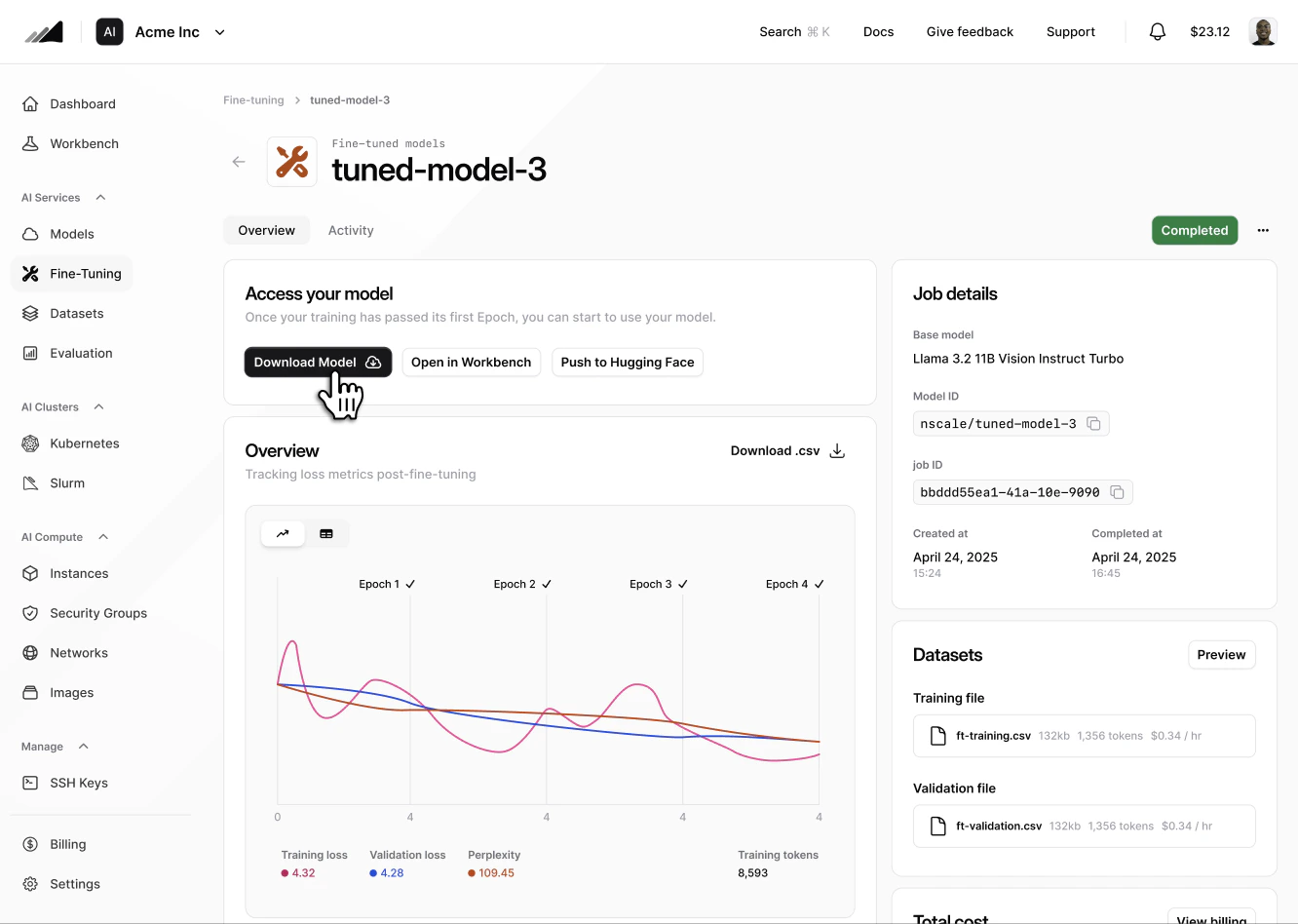
3. On the **Access your model** card, choose one of:

**Download Model**

Streams a `.tar.gz` archive of the model weights and configuration to your browser. Downloads can be large, so allow your browser a moment to start showing progress — a confirmation banner appears on the card once the download has started.

<img src="https://mintcdn.com/nscale/XKoT5pEm4wgOrYTE/images/download-model.png?fit=max&auto=format&n=XKoT5pEm4wgOrYTE&q=85&s=5a0eafc5752de09ccef93b45df2ff32e" className="rounded-lg" alt="Fine-tuning job details page in the Nscale Console with the Download Model button on the Access your model card" width="1332" height="948" data-path="images/download-model.png" />

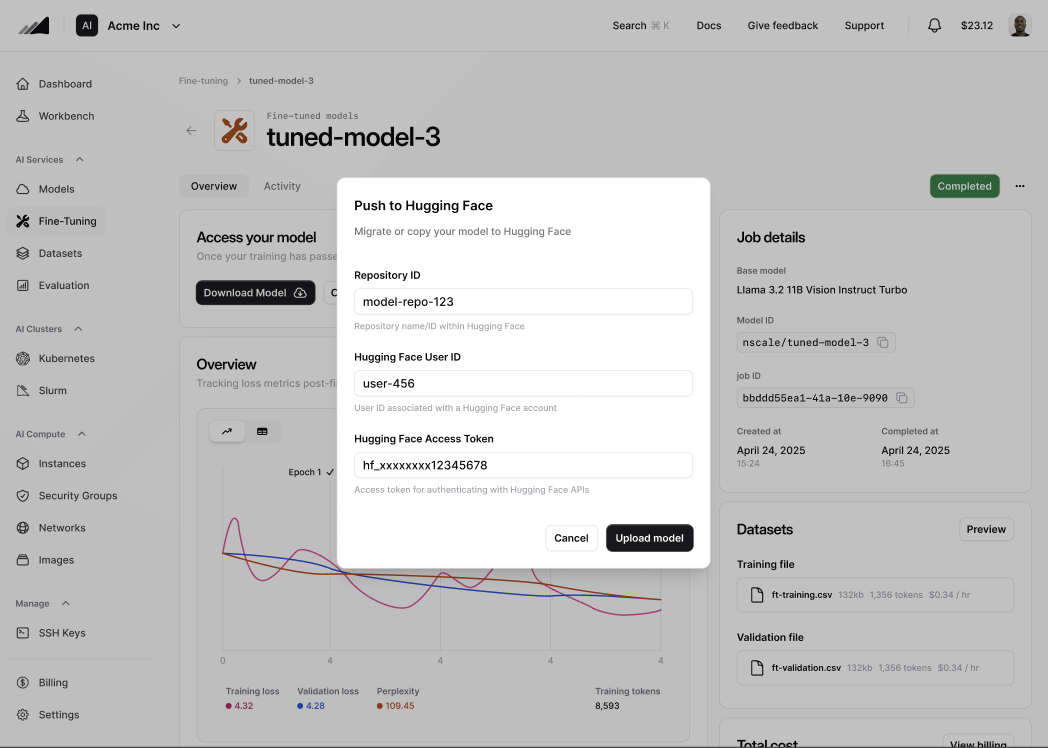
**Push to Hugging Face**

Opens a dialog for your Hugging Face repository ID, user ID, and access token. Submit the form to start an export job that uploads the weights directly to your Hugging Face repository. The export surfaces as a running export on the same card until the upload finishes.
<img src="https://mintcdn.com/nscale/XKoT5pEm4wgOrYTE/images/export-huggingface.png?fit=max&auto=format&n=XKoT5pEm4wgOrYTE&q=85&s=72d7a1f741b9d4d0abbcbcad9725cd7b" className="rounded-lg" alt="Push to Hugging Face dialog with Repository ID, Hugging Face User ID, and Hugging Face Access Token fields" width="1048" height="748" data-path="images/export-huggingface.png" />

#### Via the API

Use these endpoints when you want to script exports without leaving your terminal.

**Push to Hugging Face**

The request body matches the fields collected by the Console dialog.

```bash theme={null}
curl -X POST "https://fine-tuning.api.nscale.com/api/v1/organizations/$ORGANIZATION_ID/jobs/$JOB_ID/exports/hugging-face" \
  -H "Authorization: Bearer $NSCALE_API_TOKEN" \
  -H 'Content-Type: application/json' \
  -H 'Accept: application/json' \
  -d '{
    "huggingface_user_id": "your-hf-username",
    "huggingface_access_token": "hf_xxx",
    "huggingface_repository_id": "your-hf-username/your-model-repo"
  }'
```

**Download the model archive**

This endpoint returns a redirect to a signed URL that streams the `.tar.gz` archive containing the model weights and configuration.

```bash theme={null}
curl -L -X GET "https://fine-tuning.api.nscale.com/api/v1/organizations/$ORGANIZATION_ID/jobs/$JOB_ID/download" \
  -H "Authorization: Bearer $NSCALE_API_TOKEN" \
  -o fine_tuned_model.tar.gz
```

#### With the Python client

The [`nscaledev/demo-nscale`](https://github.com/nscaledev/demo-nscale) repository ships a thin Python client around the fine-tuning APIs. The download helpers in [`nscale/finetuning.py`](https://github.com/nscaledev/demo-nscale/blob/main/nscale/finetuning.py) and [`nscale/files.py`](https://github.com/nscaledev/demo-nscale/blob/main/nscale/files.py) wrap the endpoints above so you can pull both the model archive and the original dataset files in one script.

```python theme={null}
from nscale import FineTuningClient

with FineTuningClient(api_token=token, organization_id=org_id) as client:
    # 1) Download the fine-tuned model archive (.tar.gz)
    client.jobs.download_model(
        job_id="your-job-id",
        output_path="exports/fine_tuned_model.tar.gz",
    )

    # 2) Download the dataset source files used to train the model
    dataset = client.datasets.get("your-dataset-id")
    client.files.download_file(
        file_id=dataset["training_file_id"],
        output_path="exports/train.csv",
    )
    if dataset.get("validation_file_id"):
        client.files.download_file(
            file_id=dataset["validation_file_id"],
            output_path="exports/validation.csv",
        )
```

Under the hood, `jobs.download_model()` calls the prepare-download endpoint to fetch a signed `download_url` and streams the response to disk. `files.download_file()` follows the same pattern for the original training and validation CSVs, so you keep a full record of the inputs alongside the trained weights.

## **Fine-tuning Job Cost Estimator**

The cost of a fine-tuning job is calculated based on the following factors:

* The number of token in your training and validation files.
* The number of traning and evaluation epochs.
* The base model you are using.

<Note>
  Each fine-tuning job has a \$2.00 minimum spend, so make sure you have enough credit before starting.
</Note>

You can use following interactive tool to estimate the cost of a fine-tuning job:

<JobCostEstimator />

### Example: PubMedQA cookbook

For a concrete, end-to-end walkthrough of preparing a compatible dataset and creating a fine-tuning job, see the [PubMedQA cookbook](/docs/cookbooks/pubmedqa-fine-tuning). It covers converting PubMedQA to the required CSV format, uploading files to create a dataset, starting a job with the correct column mapping, and monitoring training metrics.
