> ## Documentation Index
> Fetch the complete documentation index at: https://docs.nscale.com/llms.txt
> Use this file to discover all available pages before exploring further.
# Reservations
> Reserve exclusive, topology-aware GB300 NVL72 GPU capacity for a project, then launch workloads onto it with placements.
A reservation ring-fences one or more contiguous **NVLink domains** of GB300 NVL72 capacity for a single project in a region. The capacity is exclusively yours for the life of the reservation—no noisy neighbors, no rescheduling—and it is the foundation you build [placements](/docs/compute/placements) on top of to launch servers.
**GB300 NVL72 is reserved capacity.** It is not available through the standard [instance creation](/docs/compute/create-new-instances) flow. To run on GB300, you reserve capacity first, then create a [placement](/docs/compute/placements) inside the reservation.
## Summary
This page walks you through working with **reservations** in the Nscale Console—the capacity model for GB300 NVL72 and future bare-metal GPU regions. You'll learn how reservations are structured, how to reserve contiguous capacity, how to read a reservation's capacity, and how to delete one.
Use this guide if you:
* Need **guaranteed, exclusive GPU capacity** for a project rather than best-effort placement
* Are preparing to run **tightly coupled training or large-scale inference** on GB300 NVL72
* Want a repeatable, UI-driven process for reserving and managing bare-metal GPU capacity
## How reservations fit together
Reservations sit at the top of a four-level hierarchy. Each level builds on the one above it:
| Concept | What it is |
| -------------------- | ---------------------------------------------------------------------------------------------------------------------------------------- |
| **Reservation unit** | The capacity shape you reserve. For GB300, **1 unit = 1 NVLink domain = 18 hosts**. GB300 NVL72 is the only unit available today. |
| **Reservation** | One or more contiguous units, ring-fenced for a project in a region. Exclusive and immutable. |
| **Placement** | A scheduled block of hosts carved out of a reservation, governed by a Pack or Spread policy. See [Placements](/docs/compute/placements). |
| **Server** | An individual bare-metal host (one compute tray) launched by a placement. |
A single reservation can host **multiple placements**—for example, a production training cluster and a smaller development cluster on the same reserved racks. The total number of servers across all placements can never exceed the reservation's capacity.
**Capacity is shown in the console.** Each reservation unit reports its per-unit totals—hosts, GPUs, CPUs, and memory—in the creation wizard and via the [reservation-units API](/api-reference/reservation-units/list-reservation-units). For GB300 NVL72, one unit corresponds to one full NVLink domain of 18 hosts.
## Availability
Reservations are the capacity model for **bare-metal GPU regions**, starting with GB300 NVL72. Capacity is contracted and region-specific, so a reservation can only be created in a region that has enough **contiguous** capacity to satisfy the full request.
## Key properties
Reservations behave differently from on-demand instances. Three properties matter most:
* **Exclusive.** Reserved capacity belongs to your project alone for the life of the reservation.
* **Contiguous and atomic.** A reservation is all-or-nothing. Either the exact contiguous capacity is delivered, or the request fails cleanly—fragmented capacity is never silently combined.
* **Immutable.** A reservation can't be edited after creation. You can add or remove placements, or delete the reservation entirely, but you can't resize it in place.
**Naming rules:** Reservation names must be **unique** and can only contain **lowercase alphanumeric characters and dashes**.
## Reservation lifecycle
A reservation moves through the following provisioning states:
| State | Description |
| ------------------ | --------------------------------------------------------------------------------------- |
| **Provisioning** | Capacity is being claimed and the NVLink domains are being ring-fenced |
| **Provisioned** | The reservation is ready and you can create placements |
| **Error** | Provisioning failed—for example, the requested contiguous capacity could not be claimed |
| **Deprovisioning** | The reservation is being torn down following a delete |
**Actions you can take:**
* **Create a placement** to start launching servers from the reservation
* **Delete a reservation** to release its capacity (this also deletes every placement in it)
## Reserve capacity
Reserving capacity is a three-step wizard. You can't proceed to the next step until the current one is valid.
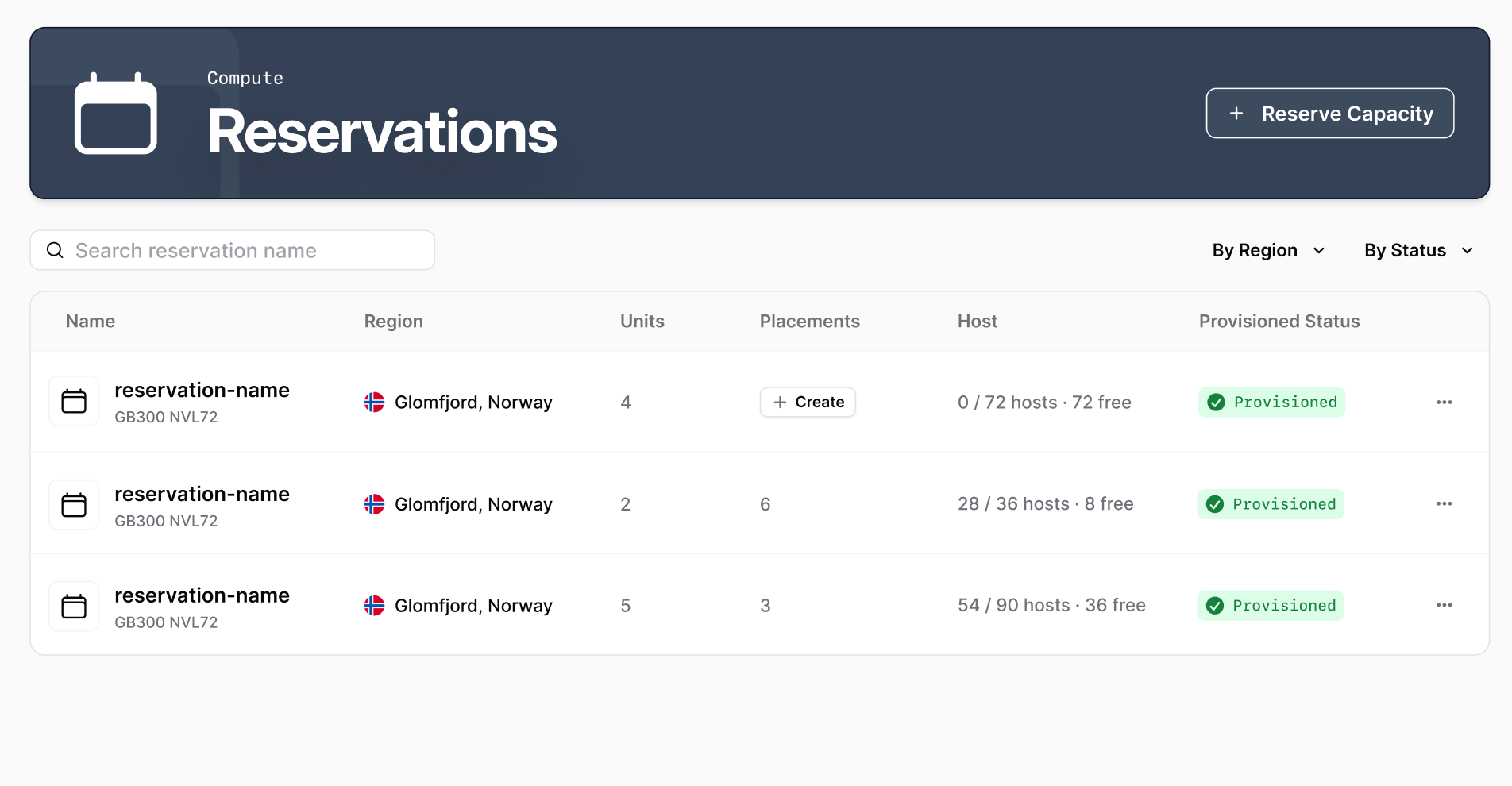
In the Console left navigation, go to **Compute** → **Reservations**, then click **Reserve Capacity**.
 Give the reservation a name under **Reservation Name**. Names must be unique and can only contain lowercase alphanumeric characters and dashes.
Click **Configuration** to continue.
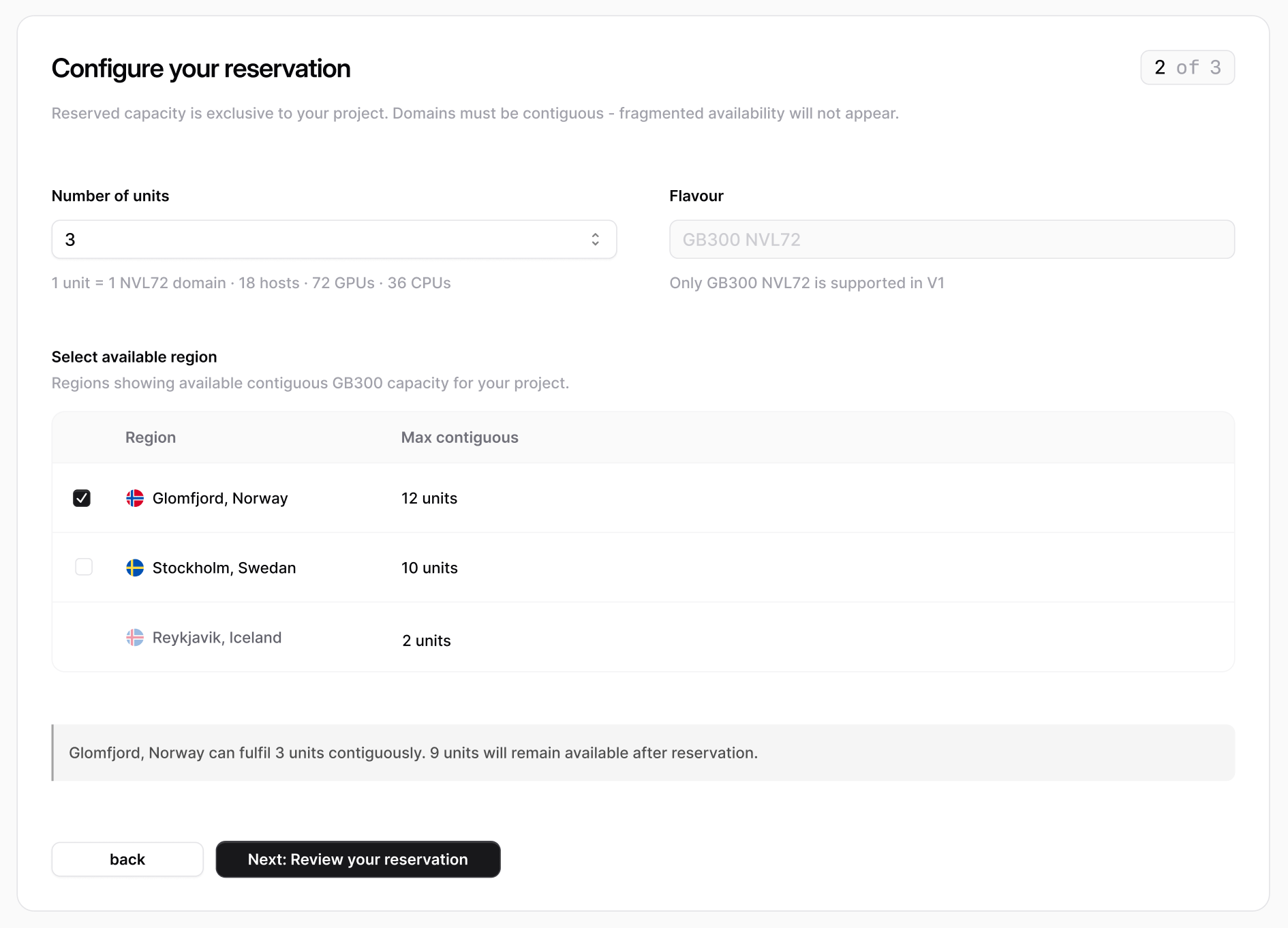
Choose how much capacity to reserve and where:
* **Flavour** is fixed to **GB300 NVL72**—the only flavour supported today.
* **Number of units** sets how many NVLink domains to reserve. The wizard shows the per-unit breakdown (hosts, GPUs, and CPUs) as you adjust the count.
* **Select available region** lists only the regions with enough **contiguous** capacity for your request, with the **Max contiguous** units available in each.
**Domains must be contiguous.** If no single region can satisfy the full request from contiguous capacity, the wizard shows *"Insufficient contiguous capacity"*. Fragmented capacity across a region can't be combined—reduce the unit count or choose another region.
Click **Review your reservation** to continue.
Give the reservation a name under **Reservation Name**. Names must be unique and can only contain lowercase alphanumeric characters and dashes.
Click **Configuration** to continue.
Choose how much capacity to reserve and where:
* **Flavour** is fixed to **GB300 NVL72**—the only flavour supported today.
* **Number of units** sets how many NVLink domains to reserve. The wizard shows the per-unit breakdown (hosts, GPUs, and CPUs) as you adjust the count.
* **Select available region** lists only the regions with enough **contiguous** capacity for your request, with the **Max contiguous** units available in each.
**Domains must be contiguous.** If no single region can satisfy the full request from contiguous capacity, the wizard shows *"Insufficient contiguous capacity"*. Fragmented capacity across a region can't be combined—reduce the unit count or choose another region.
Click **Review your reservation** to continue.
 Review the summary—name, unit count, GPU and CPU totals, and region. Reserved capacity is exclusive to your project and **can't be edited after creation**.
Click **Reserve Capacity** to submit. The reservation begins provisioning and appears in your reservations list.
Capacity is claimed asynchronously. A reservation starts in **Provisioning** and moves to **Provisioned** once all its NVLink domains are ring-fenced—typically around a minute. You can create placements as soon as it is provisioned.
## View a reservation
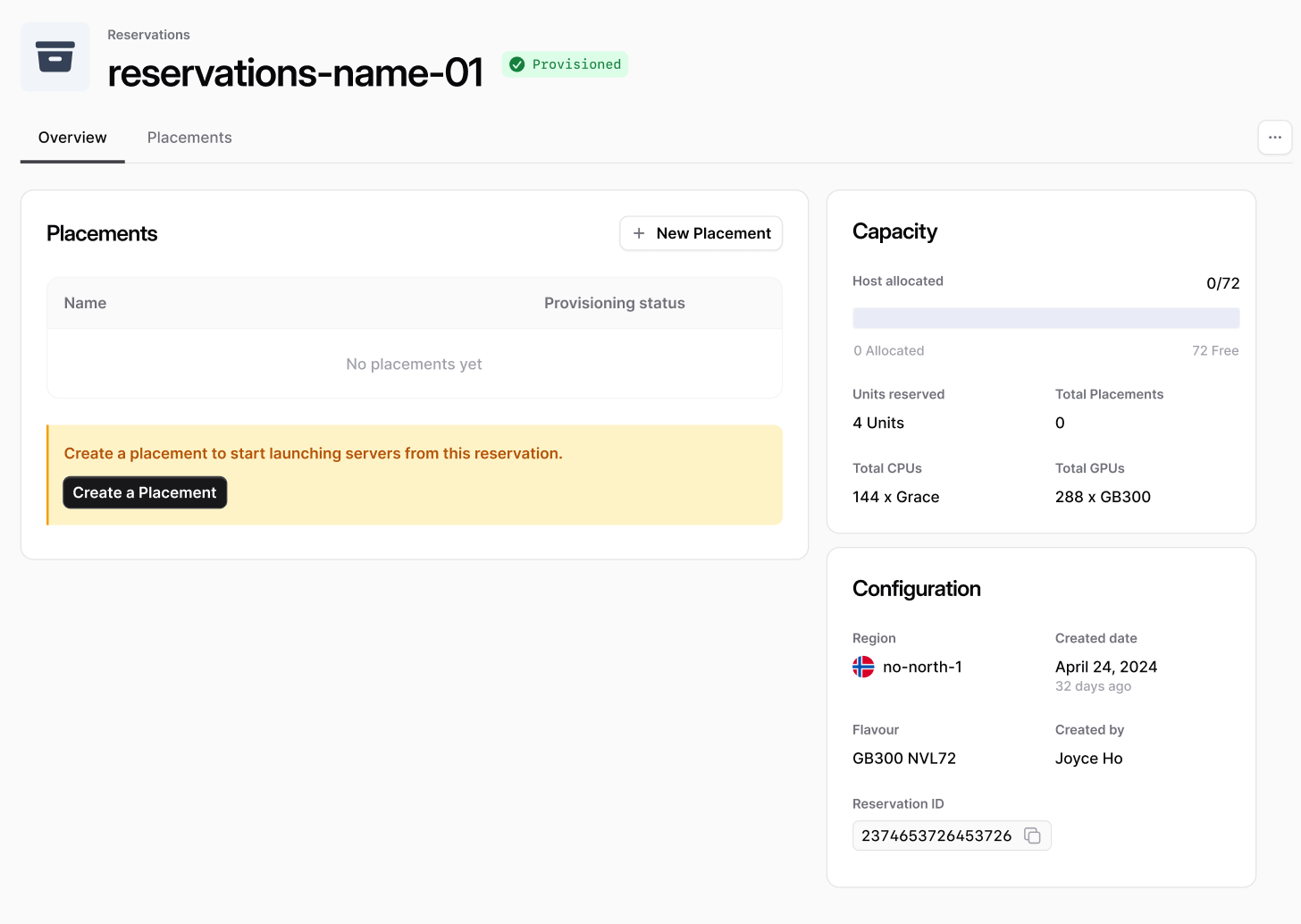
Open a reservation from the list to see its detail view. The **Overview** tab brings together everything about the reservation:
* **Placements** — the placements running in this reservation, with a shortcut to create a new one.
* **Capacity** — how many of the reservation's hosts are allocated to placements versus free, alongside units reserved, total placements, and per-host CPU and GPU counts.
* **Configuration** — the region, creation date, flavour, who created it, and the reservation ID.
Switch to the **Placements** tab for the full list of placements in the reservation, with their host count, policy, network, status, and region.
Review the summary—name, unit count, GPU and CPU totals, and region. Reserved capacity is exclusive to your project and **can't be edited after creation**.
Click **Reserve Capacity** to submit. The reservation begins provisioning and appears in your reservations list.
Capacity is claimed asynchronously. A reservation starts in **Provisioning** and moves to **Provisioned** once all its NVLink domains are ring-fenced—typically around a minute. You can create placements as soon as it is provisioned.
## View a reservation
Open a reservation from the list to see its detail view. The **Overview** tab brings together everything about the reservation:
* **Placements** — the placements running in this reservation, with a shortcut to create a new one.
* **Capacity** — how many of the reservation's hosts are allocated to placements versus free, alongside units reserved, total placements, and per-host CPU and GPU counts.
* **Configuration** — the region, creation date, flavour, who created it, and the reservation ID.
Switch to the **Placements** tab for the full list of placements in the reservation, with their host count, policy, network, status, and region.
 ## Delete a reservation
Deleting a reservation releases its capacity back to the region so it can be reserved again.
**Deleting a reservation cascades.** It deletes every [placement](/docs/compute/placements) in the reservation, and each placement deletes all of its servers. This is permanent and can't be undone—any data on those servers is lost.
Go to the reservation's detail view and review its placements—deleting the reservation will remove all of them.
Open the actions menu and choose **Delete Reservation**, then confirm. The reservation, its placements, and their servers are deleted, and the reserved capacity is released.
## Next steps
* [Create a placement](/docs/compute/placements) to launch servers from your reservation.
* Manage reservations from the command line with the [CLI](/docs/cli/overview).
* Explore the full [Reservation API reference](/api-reference/reservations/list-reservations).
## Delete a reservation
Deleting a reservation releases its capacity back to the region so it can be reserved again.
**Deleting a reservation cascades.** It deletes every [placement](/docs/compute/placements) in the reservation, and each placement deletes all of its servers. This is permanent and can't be undone—any data on those servers is lost.
Go to the reservation's detail view and review its placements—deleting the reservation will remove all of them.
Open the actions menu and choose **Delete Reservation**, then confirm. The reservation, its placements, and their servers are deleted, and the reserved capacity is released.
## Next steps
* [Create a placement](/docs/compute/placements) to launch servers from your reservation.
* Manage reservations from the command line with the [CLI](/docs/cli/overview).
* Explore the full [Reservation API reference](/api-reference/reservations/list-reservations).