> ## Documentation Index
> Fetch the complete documentation index at: https://docs.nscale.com/llms.txt
> Use this file to discover all available pages before exploring further.
# Fine-tuning PubMedQA
> Convert a sub-set of [PubMedQA](https://huggingface.co/datasets/qiaojin/PubMedQA) dataset to the required CSV format, upload as a dataset, then create and monitor a fine-tuning job on Nscale.
**Fine-tuning service going offline**
As of May 20, 2026, the existing fine-tuning service is offline while we prepare the next version. If you still need to export models or datasets, [contact support](mailto:support@nscale.com).
[Learn more ](/docs/faqs/deprecations)
## Introduction
This cookbook walks you through creating a fine-tuning dataset from the PubMedQA corpus and running an end-to-end job on Nscale.
* Dataset: [PubMedQA](https://huggingface.co/datasets/qiaojin/PubMedQA/viewer/pqa_labeled)
The goal is to demonstrate how to create a pair of CSV files in the required format (with columns `question` and `answer`) that you can upload to Nscale and use to fine-tune a base model.
## Requirements
* Python 3.9+
* Packages: datasets, pandas
* Nscale service token and organization ID
Install dependencies:
```bash theme={null}
pip install datasets pandas
```
## Generate the dataset CSVs
To use Nscale to fine-tune a model, you need a dataset in the [required CSV format](/docs/ai-services/datasets). The script below converts a small subset of PubMedQA dataset (\~2k samples) to a simple Q/A CSV format. You can adapt the same approach for other datasets.
* Input prompt: question
* Output target: long\_answer when present, otherwise the categorical final\_decision (e.g., yes/no/maybe)
It creates two CSVs: train and validation.
```python theme={null}
from typing import Dict, Iterable, Optional
import pandas as pd
from datasets import Dataset, DatasetDict, load_dataset
def example_to_qa_row(ex: Dict) -> Optional[Dict[str, str]]:
"""Convert one PubMedQA pqa_artificial example to a question/answer row.
- question: use the provided question string (omit context entirely).
- answer: prefer `long_answer` if non-empty; otherwise use `final_decision`.
"""
question = str(ex.get("question", "")).strip()
long_answer = ex.get("long_answer")
final_decision = ex.get("final_decision")
la = (str(long_answer).strip() if long_answer is not None else "")
fd = (str(final_decision).strip() if final_decision is not None else "")
answer = la if la else fd
return {"question": question, "answer": answer}
def dataset_to_csv(ds_split: Iterable[Dict], out_path: str) -> None:
rows = []
for ex in ds_split:
row = example_to_qa_row(ex)
if row:
rows.append(row)
pd.DataFrame(rows).to_csv(out_path, index=False)
def main() -> None:
"""Build train/validation Q/A split from sub-set of PubMedQA (pqa_artificial).
- Loads `qiaojin/PubMedQA` with config `pqa_artificial` (train split).
- Randomly splits into train and validation (seed=42), and select a subset of them.
- Select 2048 examples for training, and 128 for validation.
- Writes two CSVs with columns: `question`, `answer`.
- `answer` is `long_answer` if present, else `final_decision`.
"""
ds_all: DatasetDict = load_dataset("qiaojin/PubMedQA", "pqa_artificial")
if "train" not in ds_all:
raise RuntimeError("Expected a 'train' split in PubMedQA pqa_artificial")
base: Dataset = ds_all["train"]
split = base.train_test_split(test_size=0.2, seed=42, shuffle=True)
train_ds: Dataset = split["train"]
val_ds: Dataset = split["test"]
train_limit = min(len(train_ds), 2048)
val_limit = min(len(val_ds), 128)
train_head = train_ds.select(range(train_limit))
val_head = val_ds.select(range(val_limit))
dataset_to_csv(train_head, "pubmedqa_pqa_artificial_train_qa.csv")
dataset_to_csv(val_head, "pubmedqa_pqa_artificial_validation_qa.csv")
print(
"Wrote pubmedqa_pqa_artificial_train_qa.csv ({} examples) and "
"pubmedqa_pqa_artificial_validation_qa.csv ({} examples)".format(
train_limit, val_limit
)
)
if __name__ == "__main__":
main()
```
Save the script as `convert.py`, then run it:
```bash theme={null}
python convert.py
```
The script produces two files:
* `pubmedqa_pqa_artificial_train_qa.csv`
* `pubmedqa_pqa_artificial_validation_qa.csv`
Each CSV has headers `question,answer`.
## Create a fine-tuning job
You can create the fine-tuning job in the Nscale Console or via API. The steps below show how to do it with the Nscale Fine-tuning API.
### 1. Upload files
Export your Nscale token and organization ID, then upload both CSVs. Save the returned file ids for the next step.
```bash theme={null}
export NSCALE_API_TOKEN=""
export ORGANIZATION_ID=""
curl -X POST "https://fine-tuning.api.nscale.com/api/v1/organizations/$ORGANIZATION_ID/files" \
-H "Authorization: Bearer $NSCALE_API_TOKEN" \
-H 'Content-Type: multipart/form-data' \
-H 'Accept: application/json' \
-F 'file=@pubmedqa_pqa_artificial_train_qa.csv'
curl -X POST "https://fine-tuning.api.nscale.com/api/v1/organizations/$ORGANIZATION_ID/files" \
-H "Authorization: Bearer $NSCALE_API_TOKEN" \
-H 'Content-Type: multipart/form-data' \
-H 'Accept: application/json' \
-F 'file=@pubmedqa_pqa_artificial_validation_qa.csv'
```
### 2. Create the dataset
Use the two file ids returned above. Save returned dataset id to create a fine-tuning job:
```bash theme={null}
curl -X POST "https://fine-tuning.api.nscale.com/api/v1/organizations/$ORGANIZATION_ID/datasets" \
-H "Authorization: Bearer $NSCALE_API_TOKEN" \
-H 'Content-Type: application/json' \
-H 'Accept: application/json' \
-d '{
"name": "pubmedqa-pqa-labeled-qa",
"training_file_id": "",
"validation_file_id": ""
}'
```
### 3. Create and monitor a fine-tuning job
Ensure you have enough credits in your account. First, list available base models and pick one. You can also find a list of available models in the [Fine-tuning guide](/docs/ai-services/fine-tuning).
```bash theme={null}
curl -X GET "https://fine-tuning.api.nscale.com/api/v1/organizations/$ORGANIZATION_ID/base-models" \
-H "Authorization: Bearer $NSCALE_API_TOKEN" \
-H 'Accept: application/json'
```
Create a job that maps our CSV columns to the job's expected inputs. Here, `question` is the prompt and `answer` is the target output.
The example below uses `meta-llama/Meta-Llama-3.1-8B-Instruct` as the base model (ID: `5b912da4-4a68-43eb-9224-38239535d934`). Replace `base_model_id` with the ID of your chosen model from the list above.
```bash theme={null}
curl -X POST "https://fine-tuning.api.nscale.com/api/v1/organizations/$ORGANIZATION_ID/jobs" \
-H "Authorization: Bearer $NSCALE_API_TOKEN" \
-H 'Content-Type: application/json' \
-H 'Accept: application/json' \
-d '{
"name": "pubmedqa-finetune",
"base_model_id": "5b912da4-4a68-43eb-9224-38239535d934",
"dataset": {
"id": "",
"prompt_column": "question",
"answer_column": "answer"
},
"hyperparameters": {
"batch_size": 32,
"best_checkpoints": false,
"learning_rate": 0.00001,
"lora": {
"alpha": 16,
"dropout": 0,
"enabled": true,
"r": 8,
"trainable_modules": []
},
"n_epochs": 3,
"n_evals": 6,
"warmup_ratio": 0,
"weight_decay": 0.03,
"mask_prompt_labels": false
}
}'
```
List jobs and poll a specific job for status:
```bash theme={null}
curl -X GET "https://fine-tuning.api.nscale.com/api/v1/organizations/$ORGANIZATION_ID/jobs" \
-H "Authorization: Bearer $NSCALE_API_TOKEN" \
-H 'Accept: application/json'
curl -X GET "https://fine-tuning.api.nscale.com/api/v1/organizations/$ORGANIZATION_ID/jobs/" \
-H "Authorization: Bearer $NSCALE_API_TOKEN" \
-H 'Accept: application/json'
```
Retrieve training metrics (e.g., train\_loss, eval\_loss, perplexity):
```bash theme={null}
curl -X GET "https://fine-tuning.api.nscale.com/api/v1/organizations/$ORGANIZATION_ID/jobs//metrics" \
-H "Authorization: Bearer $NSCALE_API_TOKEN" \
-H 'Accept: application/json'
```
When the job completes, export to Hugging Face or download the model as needed. See the [Fine-tuning guide](/docs/ai-services/fine-tuning) for details.
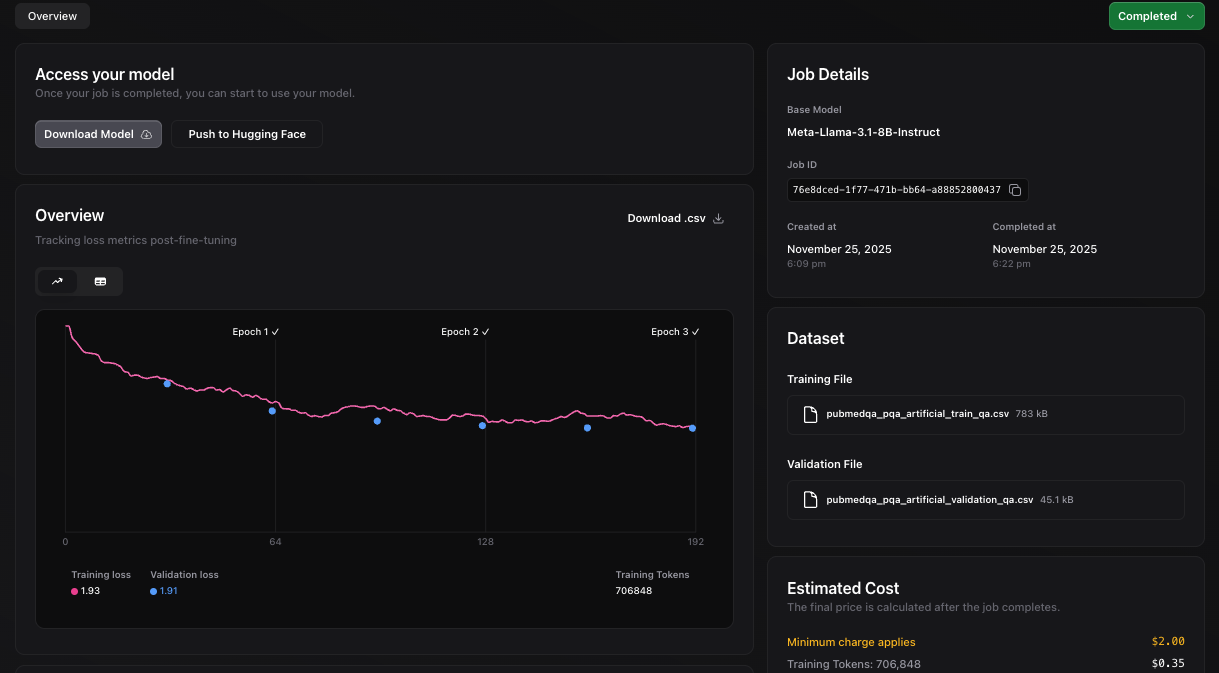
Alternatively, you can monitor your fine-tuning job progress from [Nscale UI console](https://console.nscale.com/) live, as shown below.