> ## Documentation Index
> Fetch the complete documentation index at: https://docs.nscale.com/llms.txt
> Use this file to discover all available pages before exploring further.
# Managed Kubernetes
> Create and run single-tenant Kubernetes clusters on on-demand or reserved GPU capacity with Nscale Kubernetes Service (NKS).
Nscale Kubernetes Service (NKS) runs Kubernetes clusters for you. Nscale operates the parts that keep a cluster running, and you get a private cluster to deploy your workloads on with standard tools like `kubectl` and `helm`. Your workloads run on on-demand machines or on bare-metal GPU capacity you've [reserved](/docs/compute/reservations).
**Before you start, you need:**
* A [project](/docs/manage/projects) and a [VPC network](/docs/network/vpc-networks) in the region you want the cluster in.
* A **provisioned** [reservation](/docs/compute/reservations) with free hosts, if you want NVIDIA bare-metal machines.
* The right [permissions](#permissions) for NKS.
* The [Nscale CLI](/docs/cli/overview) **v5.0.0 or later**, logged in with `nscale login`, and [kubectl](https://kubernetes.io/docs/tasks/tools/) installed on your computer.
## Summary
Getting a cluster running takes four steps:
1. [Create the cluster](#create-a-cluster) in the console. You pick a network, a Kubernetes version, and the machines to run on.
2. Wait for its status to change from **Provisioning** to **Provisioned**.
3. Run the command on the cluster's **Access your cluster** card to [connect `kubectl`](#access-your-cluster).
4. Run `kubectl get nodes` to check the connection, then deploy your workloads.
The rest of this page covers each step in detail, how to manage the cluster afterwards, and [advanced configuration](#advanced-configuration) such as your own sign-in provider.
## Availability
Managed Kubernetes is available to **reserved cloud** organizations and is enabled per organization. If you don't see **Kubernetes** under **Services** in the console sidebar, contact your Nscale account team.
## Key concepts
| Term | What it means |
| - | - |
| **Cluster** | Your Kubernetes environment. It belongs to one project. |
| **Control plane** | The Kubernetes components that run the cluster itself, such as the API server that `kubectl` talks to. Nscale runs these for you. See [How NKS runs your cluster](#how-nks-runs-your-cluster). |
| **Node** | One machine that runs your workloads. |
| **Node pool** | A group of identical nodes. A cluster needs at least one. A pool is either a compute pool or a [reservation pool](/docs/compute/reservations) (see below). |
| **Node type** | The kind of machine every node in a pool uses. You pick it when you create the pool and can't change it later. |
| **Regional VPC** | The [network](/docs/network/vpc-networks) the cluster joins. It decides the cluster's region, and you can't change it after the cluster is created. |
| **NKS version** | The Kubernetes version plus the add-ons NKS installs, released together. The console also calls it the **platform release** or **release**. |
| **kubeconfig** | The file `kubectl` reads to find a cluster and sign in to it. |
### Compute pools and reservation pools
The node type you pick decides which kind of pool you get:
| | Compute pool | Reservation pool |
| - | - | - |
| **Node types** | Virtual machines, and bare-metal machines that aren't NVIDIA | NVIDIA bare-metal machines, which are only sold as reserved capacity |
| **Where the machines come from** | Created on demand | Taken from one of your [reservations](/docs/compute/reservations). NKS creates a [placement](/docs/compute/placements) in it for the pool. |
| **How you size it** | **Number of Replicas** | **Host Count**, plus a **Pack** or **Spread** placement policy |
| **Resize later?** | Yes | No. Add a new pool instead. |
| **Uses GPU quota?** | Yes, for GPU node types | No, the capacity is already reserved |
| **Icon in the console** | Stacked layers | Bookmark |
In a [reservation pool](/docs/compute/reservations), each host becomes one node. For GB300 NVL72, one host is one compute tray. The console labels a reservation pool's name field **Placement Pool Name**.
## Create a cluster
In your [project](/docs/manage/projects), go to **Services → Kubernetes** and click **Create Cluster**. The create flow has four steps. Steps 2 to 4 unlock once you've named the cluster and picked a [VPC](/docs/network/vpc-networks).
 * **Name**: 3–50 lowercase letters, digits, and dashes. It must start with a letter or digit, can't end with a dash, and can't contain `nscale`. You can't rename a cluster later.
* **Choose your Regional VPC**: the network the cluster joins, which also sets its region. You can't change it later. To create a [VPC](/docs/network/vpc-networks) without leaving the create flow, click **Add new VPC**.
If you come back and change the VPC, any node types you've picked are cleared, because each region offers different machines.
Node labels and initial taints can't be set in the console. Use the API or the [Nscale CLI](/docs/cli/kubernetes#nodepool-create) instead.
| Setting | Default | What it does | Change later? |
| - | - | - | - |
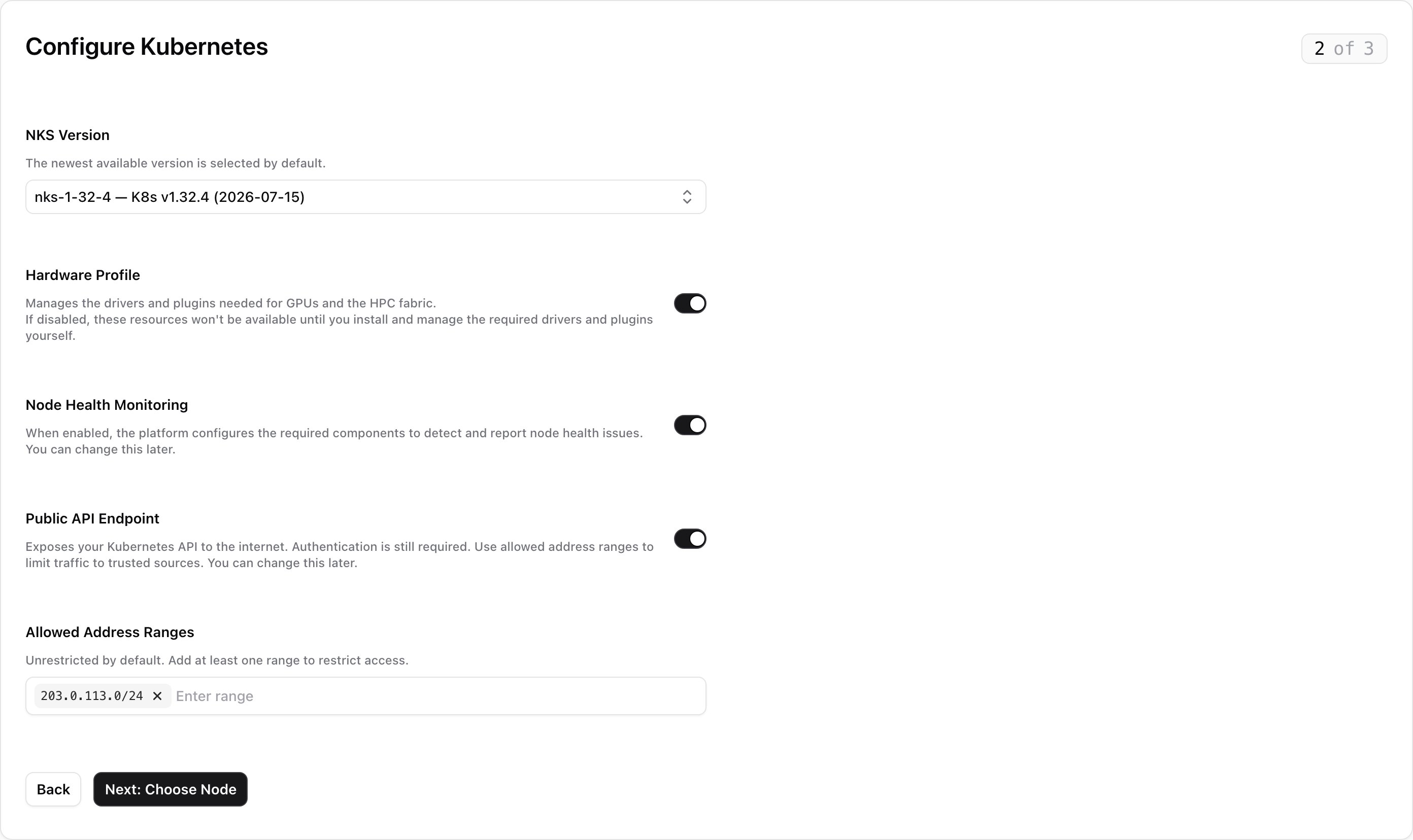
| **NKS Version** | Newest available | The Kubernetes version and add-ons the cluster runs. Only current versions offered in the VPC's region are listed. | [Upgrade only](#upgrade-a-cluster) |
| **Hardware Profile** | On | Installs the drivers and plugins GPUs and the HPC network need. If you turn it off, you install and manage them yourself. | Yes, in **Settings** |
| **Node Health Monitoring** | On | Detects and reports problems with your nodes. | Yes, in **Settings** |
| **Public API Endpoint** | Off | Makes the cluster's API reachable from the internet. Sign-in is still required. When it's off, you can only reach the API from inside the cluster's VPC. | Yes, with [Manage Access](#manage-api-access) |
| **Allowed Address Ranges** | Empty | Only shown when the public endpoint is on. Limits which IPv4 ranges can reach the API, for example `10.0.0.0/8`. Leave it empty to allow any address. | Yes, with [Manage Access](#manage-api-access) |
Nscale manages the control plane over its own network, so it never needs the public endpoint.
* **Name**: 3–50 lowercase letters, digits, and dashes. It must start with a letter or digit, can't end with a dash, and can't contain `nscale`. You can't rename a cluster later.
* **Choose your Regional VPC**: the network the cluster joins, which also sets its region. You can't change it later. To create a [VPC](/docs/network/vpc-networks) without leaving the create flow, click **Add new VPC**.
If you come back and change the VPC, any node types you've picked are cleared, because each region offers different machines.
Node labels and initial taints can't be set in the console. Use the API or the [Nscale CLI](/docs/cli/kubernetes#nodepool-create) instead.
| Setting | Default | What it does | Change later? |
| - | - | - | - |
| **NKS Version** | Newest available | The Kubernetes version and add-ons the cluster runs. Only current versions offered in the VPC's region are listed. | [Upgrade only](#upgrade-a-cluster) |
| **Hardware Profile** | On | Installs the drivers and plugins GPUs and the HPC network need. If you turn it off, you install and manage them yourself. | Yes, in **Settings** |
| **Node Health Monitoring** | On | Detects and reports problems with your nodes. | Yes, in **Settings** |
| **Public API Endpoint** | Off | Makes the cluster's API reachable from the internet. Sign-in is still required. When it's off, you can only reach the API from inside the cluster's VPC. | Yes, with [Manage Access](#manage-api-access) |
| **Allowed Address Ranges** | Empty | Only shown when the public endpoint is on. Limits which IPv4 ranges can reach the API, for example `10.0.0.0/8`. Leave it empty to allow any address. | Yes, with [Manage Access](#manage-api-access) |
Nscale manages the control plane over its own network, so it never needs the public endpoint.
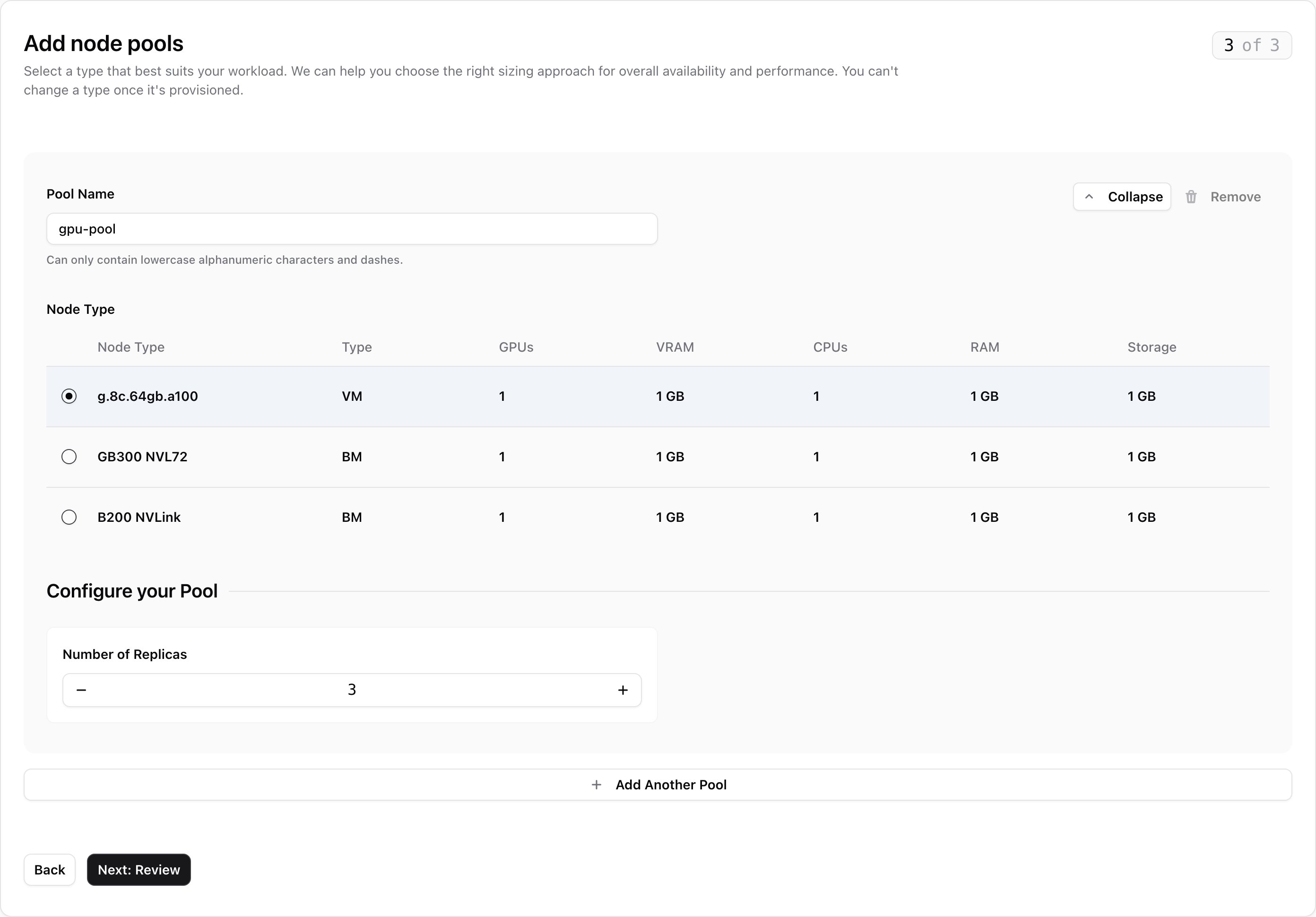
 Name the pool and pick a node type from the table. The pool name must be unique in the cluster and follow the same rules as the cluster name. A node type is grayed out if the selected NKS version doesn't support it.
The rest of the step depends on the node type you picked:
Under **Configure your Pool**, set **Number of Replicas**: how many nodes the pool runs.
Name the pool and pick a node type from the table. The pool name must be unique in the cluster and follow the same rules as the cluster name. A node type is grayed out if the selected NKS version doesn't support it.
The rest of the step depends on the node type you picked:
Under **Configure your Pool**, set **Number of Replicas**: how many nodes the pool runs.
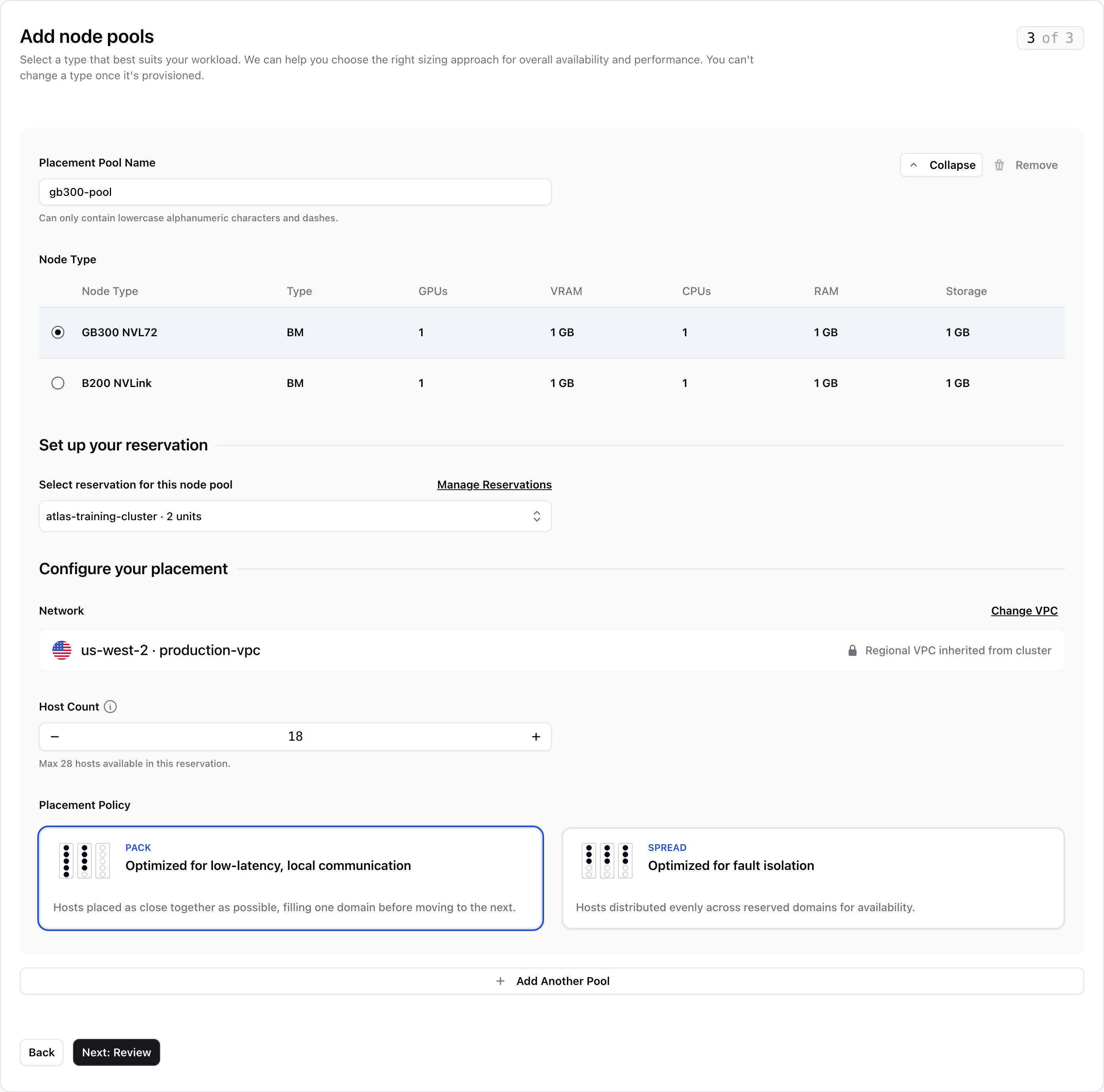
 1. Under **Set up your reservation**, pick a reservation in **Select reservation for this node pool**. Only provisioned reservations for the chosen node type are listed.
2. Under **Configure your placement**, set **Host Count**: how many of the [reservation](/docs/compute/reservations)'s hosts the pool uses. The limit is the reservation's free hosts, minus any that other pools in this cluster already use.
3. Pick a **Placement Policy**. **Pack** keeps hosts close together for fast communication. **Spread** spreads them out so one failure affects fewer of them. See [Placement policy](/docs/compute/placements#placement-policy).
The **Network** row shows the cluster's [VPC](/docs/network/vpc-networks), which the pool uses too. **Change VPC** takes you back to step 1, and changing the VPC clears the node types you've picked.
1. Under **Set up your reservation**, pick a reservation in **Select reservation for this node pool**. Only provisioned reservations for the chosen node type are listed.
2. Under **Configure your placement**, set **Host Count**: how many of the [reservation](/docs/compute/reservations)'s hosts the pool uses. The limit is the reservation's free hosts, minus any that other pools in this cluster already use.
3. Pick a **Placement Policy**. **Pack** keeps hosts close together for fast communication. **Spread** spreads them out so one failure affects fewer of them. See [Placement policy](/docs/compute/placements#placement-policy).
The **Network** row shows the cluster's [VPC](/docs/network/vpc-networks), which the pool uses too. **Change VPC** takes you back to step 1, and changing the VPC clears the node types you've picked.
 To add more pools, click **Add Another Pool** once the current one is complete. Only one pool is open at a time: **Collapse** folds it into a summary row, and **Remove** deletes it. A pool you haven't changed from its defaults is ignored.
Check the [VPC](/docs/network/vpc-networks) and each node pool, then click **Create Cluster**. If your compute pools use GPUs, the review shows how much of your [GPU quota](#quotas) they need.
The console creates the cluster, then each node pool, and opens the cluster's page. Its status changes from **Provisioning** to **Provisioned** when it's ready.
**If a node pool fails, the cluster is still created.** A notification names the missing pools, for example "my-cluster was created with 1 of 2 node pools". Add them from the cluster's **Node Pools** tab. Don't run the create flow again, or you'll create a second cluster.
## Access your cluster
When the cluster is ready, the **Access your cluster** card on its **Overview** tab shows a command that sets up `kubectl`. Until then, the card says the endpoint isn't published yet.
Copy the command from the card. On its own, it prints the kubeconfig to your terminal. Add `--merge` to save it into the kubeconfig `kubectl` already uses (`$KUBECONFIG` or `~/.kube/config`) and switch to it:
```bash theme={null}
nscale k8s kubeconfig get \
--org \
--cluster \
--merge
```
To save it as a separate file instead, use `--output` (`-o`):
```bash theme={null}
nscale k8s kubeconfig get --org --cluster -o my-cluster.yaml
export KUBECONFIG=$PWD/my-cluster.yaml
```
```bash theme={null}
kubectl get nodes
```
You'll see the cluster's nodes and their Kubernetes version. Nodes appear as their pools finish provisioning.
The kubeconfig contains no password or token. Each time `kubectl` needs one, it asks the Nscale CLI for a fresh token. So the file never goes stale, and sharing it doesn't give anyone access.
**What you can do in the cluster depends on your `nks:kubernetes-api` permission.** **Read** gives you read-only access (the Kubernetes `view` role). **Update** gives you full admin access (`cluster-admin`). Without either, the command still runs but `kubectl` fails, and the card tells you so.
The kubeconfig uses the public endpoint if the cluster has one, and the private one otherwise. To force the private endpoint, add `--endpoint private`. It only works from inside the cluster's VPC.
## View a cluster
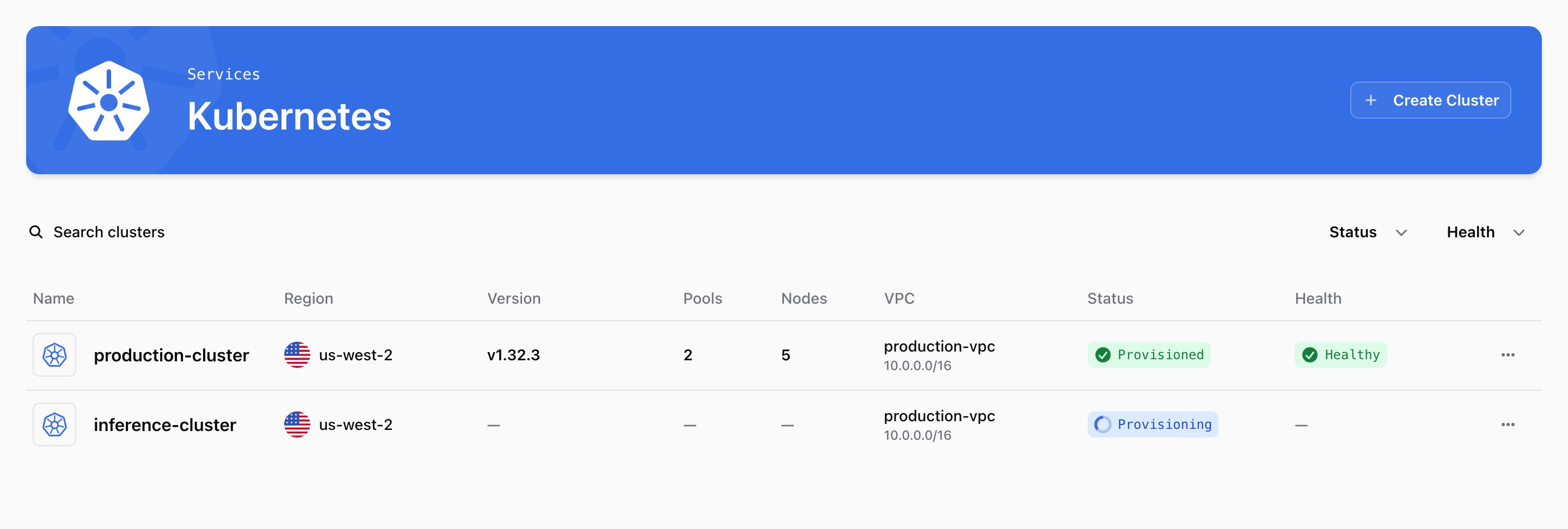
The **Kubernetes** page lists your project's clusters. Click one to open it. The cluster page has three tabs, **Overview**, **Node Pools**, and **Settings**, and an actions menu with **Copy ID**, **Copy as JSON**, and **Delete Cluster**.
The list's **Version** column shows the Kubernetes version each cluster runs.
### Overview
To add more pools, click **Add Another Pool** once the current one is complete. Only one pool is open at a time: **Collapse** folds it into a summary row, and **Remove** deletes it. A pool you haven't changed from its defaults is ignored.
Check the [VPC](/docs/network/vpc-networks) and each node pool, then click **Create Cluster**. If your compute pools use GPUs, the review shows how much of your [GPU quota](#quotas) they need.
The console creates the cluster, then each node pool, and opens the cluster's page. Its status changes from **Provisioning** to **Provisioned** when it's ready.
**If a node pool fails, the cluster is still created.** A notification names the missing pools, for example "my-cluster was created with 1 of 2 node pools". Add them from the cluster's **Node Pools** tab. Don't run the create flow again, or you'll create a second cluster.
## Access your cluster
When the cluster is ready, the **Access your cluster** card on its **Overview** tab shows a command that sets up `kubectl`. Until then, the card says the endpoint isn't published yet.
Copy the command from the card. On its own, it prints the kubeconfig to your terminal. Add `--merge` to save it into the kubeconfig `kubectl` already uses (`$KUBECONFIG` or `~/.kube/config`) and switch to it:
```bash theme={null}
nscale k8s kubeconfig get \
--org \
--cluster \
--merge
```
To save it as a separate file instead, use `--output` (`-o`):
```bash theme={null}
nscale k8s kubeconfig get --org --cluster -o my-cluster.yaml
export KUBECONFIG=$PWD/my-cluster.yaml
```
```bash theme={null}
kubectl get nodes
```
You'll see the cluster's nodes and their Kubernetes version. Nodes appear as their pools finish provisioning.
The kubeconfig contains no password or token. Each time `kubectl` needs one, it asks the Nscale CLI for a fresh token. So the file never goes stale, and sharing it doesn't give anyone access.
**What you can do in the cluster depends on your `nks:kubernetes-api` permission.** **Read** gives you read-only access (the Kubernetes `view` role). **Update** gives you full admin access (`cluster-admin`). Without either, the command still runs but `kubectl` fails, and the card tells you so.
The kubeconfig uses the public endpoint if the cluster has one, and the private one otherwise. To force the private endpoint, add `--endpoint private`. It only works from inside the cluster's VPC.
## View a cluster
The **Kubernetes** page lists your project's clusters. Click one to open it. The cluster page has three tabs, **Overview**, **Node Pools**, and **Settings**, and an actions menu with **Copy ID**, **Copy as JSON**, and **Delete Cluster**.
The list's **Version** column shows the Kubernetes version each cluster runs.
### Overview
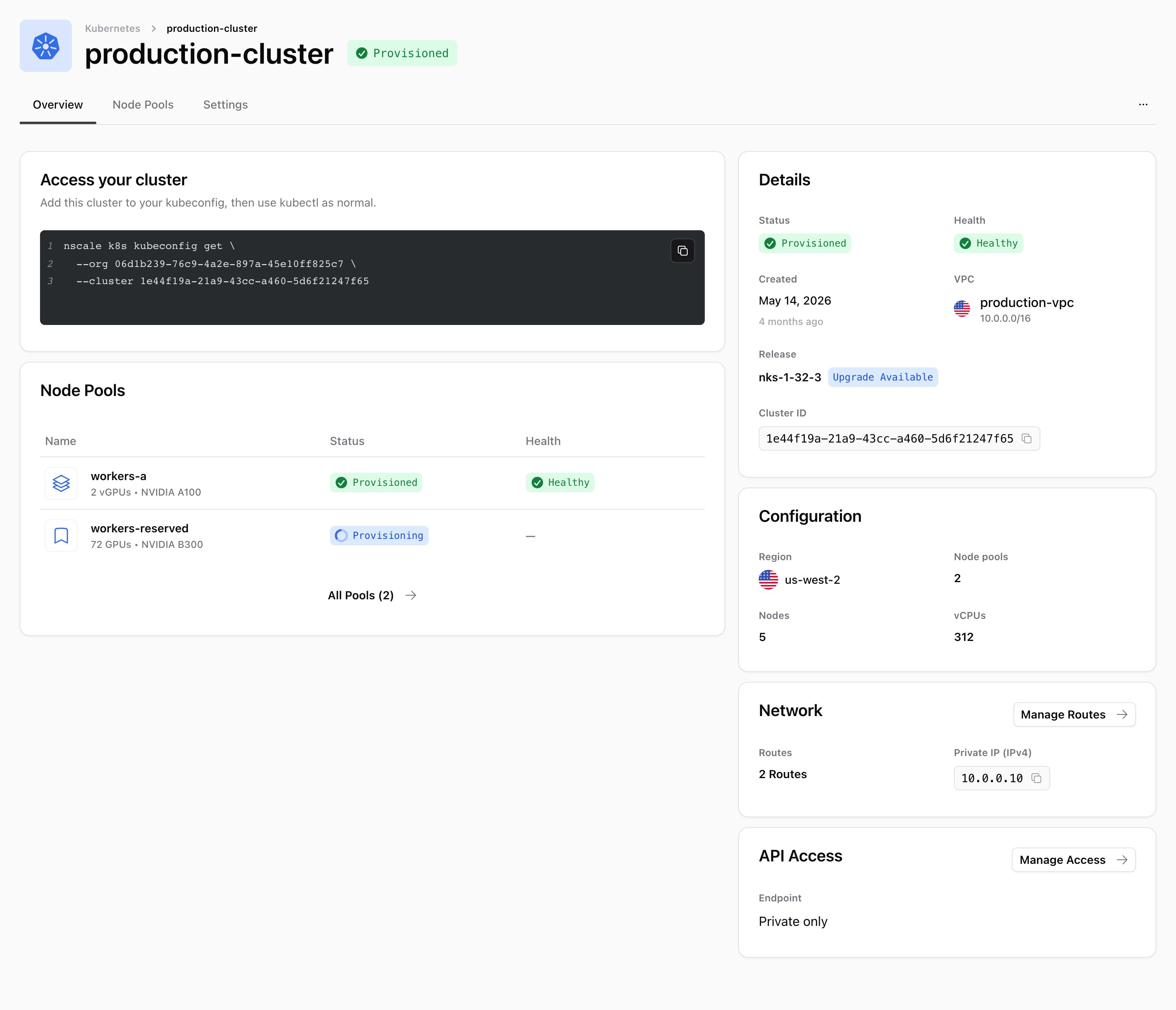 | Card | What it shows |
| - | - |
| **Access your cluster** | The command to connect `kubectl`. See [Access your cluster](#access-your-cluster). |
| **Node Pools** | The first few pools and their status. **All Pools** opens the **Node Pools** tab. |
| **Details** | Status, health, creation date, VPC, NKS version, and cluster ID. A **Withdrawn**, **Deprecated**, or **Upgrade Available** badge appears next to the version when it applies. |
| **Configuration** | Region, number of pools and nodes, and total vCPUs. |
| **Network** | The [VPC](/docs/network/vpc-networks)'s route count and the API's private IP address. **Manage Routes** opens the VPC's routes. |
| **API Access** | Whether the API is private or public, its public IP address, and its allowed address ranges. |
### Manage API access
To change who can reach the API, click **Manage Access** on the **API Access** card. Turn **Public API Endpoint** on or off, edit **Allowed Address Ranges**, and click **Save Changes**. Turning off the public endpoint also clears the ranges.
### Node Pools tab
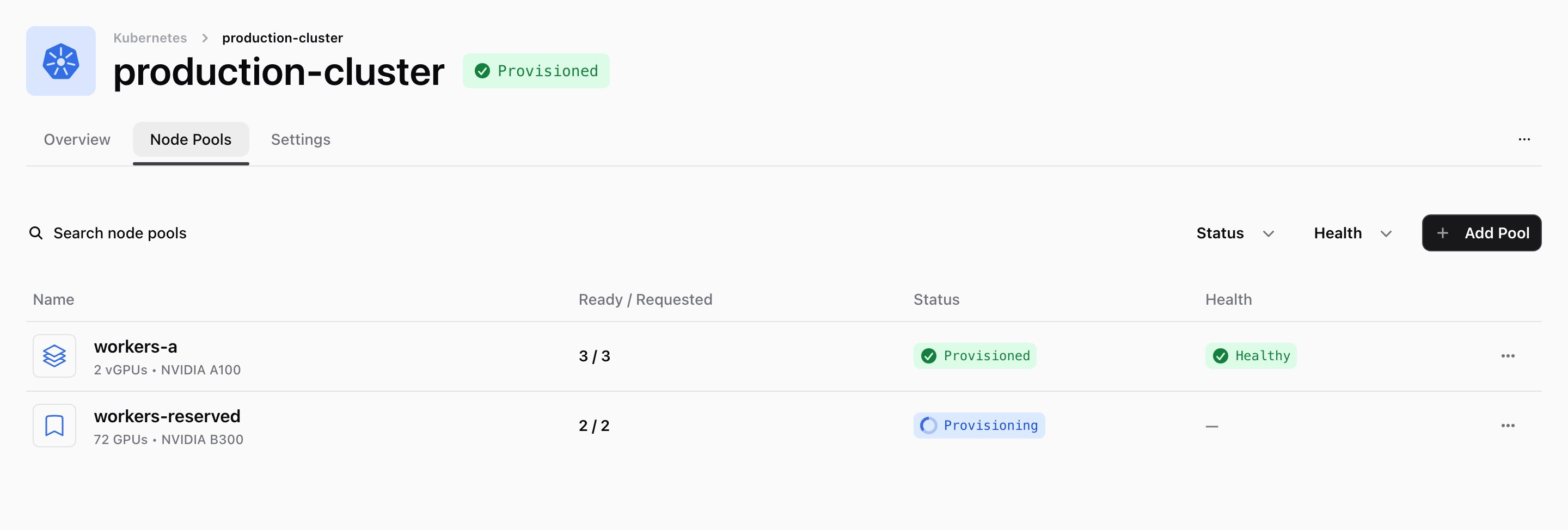
This tab lists every pool with its node type, how many nodes are ready out of the number requested (**Ready / Requested**), and its **Status** and **Health**. The icon shows whether it's a compute pool (stacked layers) or a reservation pool (bookmark). See [Manage node pools](#manage-node-pools).
| Card | What it shows |
| - | - |
| **Access your cluster** | The command to connect `kubectl`. See [Access your cluster](#access-your-cluster). |
| **Node Pools** | The first few pools and their status. **All Pools** opens the **Node Pools** tab. |
| **Details** | Status, health, creation date, VPC, NKS version, and cluster ID. A **Withdrawn**, **Deprecated**, or **Upgrade Available** badge appears next to the version when it applies. |
| **Configuration** | Region, number of pools and nodes, and total vCPUs. |
| **Network** | The [VPC](/docs/network/vpc-networks)'s route count and the API's private IP address. **Manage Routes** opens the VPC's routes. |
| **API Access** | Whether the API is private or public, its public IP address, and its allowed address ranges. |
### Manage API access
To change who can reach the API, click **Manage Access** on the **API Access** card. Turn **Public API Endpoint** on or off, edit **Allowed Address Ranges**, and click **Save Changes**. Turning off the public endpoint also clears the ranges.
### Node Pools tab
This tab lists every pool with its node type, how many nodes are ready out of the number requested (**Ready / Requested**), and its **Status** and **Health**. The icon shows whether it's a compute pool (stacked layers) or a reservation pool (bookmark). See [Manage node pools](#manage-node-pools).
 ### Settings tab
* **Cluster info**: the cluster's name and project. Names can't be changed.
* **Cluster configuration**: click **Edit** to [upgrade the NKS version](#upgrade-a-cluster) or turn **Hardware Profile** and **Node Health Monitoring** on or off, then click **Save Changes**. The VPC is shown but can't be changed.
* **Delete**: see [Delete a cluster](#delete-a-cluster).
## Upgrade a cluster
When a newer NKS version is available, the **Details** card shows **Upgrade Available**.
On the cluster's **Settings** tab, click **Edit** on the **Cluster configuration** card.
Pick a version from **Platform release**. Only the current version and the ones you can upgrade to are listed.
Click **Save Changes** to start the upgrade.
**Upgrades can't be undone.** You can't move a cluster back to an earlier version.
## Manage node pools
### Add a node pool
On the **Node Pools** tab, click **Add Pool**. The page works like step 3 of the create flow: set up one or more pools under **Configure your node pools**, check them under **Review your node pools**, and click **Add Pools**. Each new pool needs a name the cluster doesn't already use, and runs the cluster's current NKS version.
### Edit a node pool
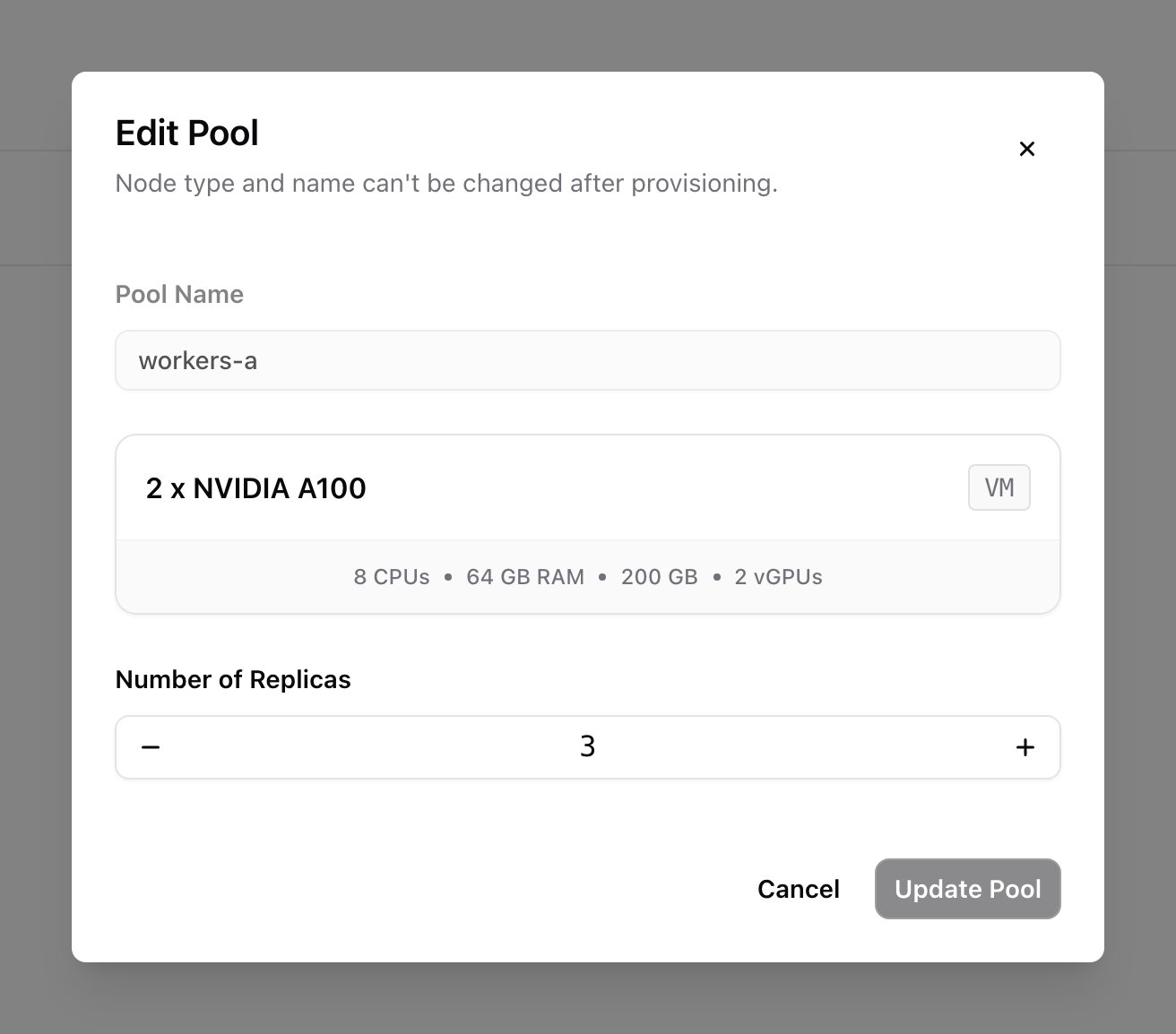
You can only change the size of a compute pool. From its row menu, choose **Edit Pool**, change **Number of Replicas**, and click **Update Pool**. Its name and node type stay the same.
A [reservation pool](/docs/compute/reservations) can't be changed after it's created: its host count, placement policy, taints, and labels are fixed. To change any of them, [add a new pool](#add-a-node-pool) and delete the old one.
### Settings tab
* **Cluster info**: the cluster's name and project. Names can't be changed.
* **Cluster configuration**: click **Edit** to [upgrade the NKS version](#upgrade-a-cluster) or turn **Hardware Profile** and **Node Health Monitoring** on or off, then click **Save Changes**. The VPC is shown but can't be changed.
* **Delete**: see [Delete a cluster](#delete-a-cluster).
## Upgrade a cluster
When a newer NKS version is available, the **Details** card shows **Upgrade Available**.
On the cluster's **Settings** tab, click **Edit** on the **Cluster configuration** card.
Pick a version from **Platform release**. Only the current version and the ones you can upgrade to are listed.
Click **Save Changes** to start the upgrade.
**Upgrades can't be undone.** You can't move a cluster back to an earlier version.
## Manage node pools
### Add a node pool
On the **Node Pools** tab, click **Add Pool**. The page works like step 3 of the create flow: set up one or more pools under **Configure your node pools**, check them under **Review your node pools**, and click **Add Pools**. Each new pool needs a name the cluster doesn't already use, and runs the cluster's current NKS version.
### Edit a node pool
You can only change the size of a compute pool. From its row menu, choose **Edit Pool**, change **Number of Replicas**, and click **Update Pool**. Its name and node type stay the same.
A [reservation pool](/docs/compute/reservations) can't be changed after it's created: its host count, placement policy, taints, and labels are fixed. To change any of them, [add a new pool](#add-a-node-pool) and delete the old one.
 ### Delete a node pool
From the pool's row menu, choose **Delete Pool** and type its name to confirm. Its nodes are drained and removed, and your workloads move to the cluster's other pools.
If it's the cluster's **only** pool, your workloads have nowhere to move and stop running until you add another pool.
### View a node pool
Click a pool to open it. The header shows its status and health, links to its cluster (and reservation, for a [reservation pool](/docs/compute/reservations)), and what each node provides. For a reservation pool, it also shows the placement policy and host count.
* **Compute pool**: the **Nodes** table lists each node with its private IP and **Power Status**. Use **Stop** or **Start** in the row, or **Reboot Node** from the row menu.
* **[Reservation pool](/docs/compute/reservations)**: the table lists the servers of the pool's [placement](/docs/compute/placements), once NKS has taken its hosts from the reservation. Use **Stop** in the row, or **Reboot Server** (hard reboot) or **Soft Reboot Server** from the row menu. A stopped server shows **Reboot** to turn it back on.
You can't delete a single node or server. NKS manages them and would replace it. To make a compute pool smaller, [edit its size](#edit-a-node-pool).
## Delete a cluster
Choose **Delete Cluster** from the cluster's row menu on the **Kubernetes** page, or from the actions menu or **Settings** tab on the cluster's page.
Type the cluster's name to confirm.
**Deleting a cluster is permanent.** Its node pools and everything running on them are destroyed. Save any data you need outside the cluster first.
## Cluster and node pool status
The **Status** column shows where a cluster or node pool is in its lifecycle:
| Status | Meaning |
| - | - |
| **Pending** | Accepted, waiting to start |
| **Provisioning** | Being created |
| **Provisioned** | Ready to use |
| **Deprovisioning** | Being deleted |
| **Error** | Something went wrong |
Once it's **Provisioned**, the **Health** column shows how it's doing. Before that, the column is empty.
| Health | Meaning |
| - | - |
| **Healthy** | Everything is working |
| **Degraded** | Running, but some parts aren't ready |
| **Error** | In an error state |
| **Unknown** | Health can't be determined |
## Permissions
The console hides anything your role can't do. These are the permissions (scopes) each task needs. To grant them, see [Roles and groups](/docs/manage/roles-and-groups).
| To do this | You need |
| - | - |
| See clusters | `nks:clusters` read |
| Create a cluster | `nks:clusters` create, `nks:nodepools` create, and `nks:platformreleases` read |
| Change API access, upgrade, or turn add-ons on or off | `nks:clusters` update |
| Delete a cluster | `nks:clusters` delete |
| See node pools | `nks:nodepools` read |
| Add a node pool | `nks:nodepools` create and read (read is needed to check the name isn't taken) |
| Resize a compute pool | `nks:nodepools` update |
| Delete a node pool | `nks:nodepools` delete |
| Use the cluster with `kubectl`, read-only | `nks:kubernetes-api` read |
| Use the cluster with `kubectl`, full admin | `nks:kubernetes-api` update |
| Pick node types | `compute:flavors` read, granted organization-wide |
| Set up a [reservation pool](/docs/compute/reservations) | `reservation:reservations`, `reservation:placements`, and `reservation:reservation-units` read. `reservation:reservation-units` must be granted organization-wide. |
| Use the **Add Reservation** shortcut | `reservation:reservations` create |
| See or power-cycle a compute pool's nodes | `compute:instances` read, and update to stop, start, or reboot |
| See or power-cycle a [reservation pool](/docs/compute/reservations)'s servers | `reservation:placement-servers` read, and update to stop or reboot |
## Quotas
Compute pools with GPU node types use your organization's GPU quota. [Reservation pools](/docs/compute/reservations) don't, because that capacity is already reserved. To check your quota, go to **Resource Usage** on the **Dashboard**.
## How NKS runs your cluster
NKS runs each cluster's control plane on its own machines, separate from your node pools: the API server, the scheduler, the controllers, and etcd, the database that stores the cluster's state. Nscale sets them up, keeps them running, and replaces them when needed.
* **Always available.** The control plane runs as three copies on separate machines, so the cluster keeps working if one fails.
* **Careful maintenance.** When NKS replaces a machine, it starts the new one and waits for it to be healthy before removing the old one.
* **Your workloads keep running.** If the control plane is briefly unavailable, you can't deploy or change things, but workloads already running on healthy nodes keep going. Applications that call the Kubernetes API all the time can still notice.
* **Certificates.** Nscale renews the control plane's certificates without changing the cluster's certificate authority (CA), so your clients keep trusting the cluster. Replacing the cluster CA isn't supported.
* **Secrets.** NKS doesn't encrypt Kubernetes Secrets at rest.
### Who manages what
| Area | Nscale | You |
| - | - | - |
| Control plane | Setup, configuration, upgrades, replacing machines, and certificates | Choosing the NKS version, and keeping your applications compatible with it |
| Access | The API endpoint and the sign-in methods you configure | Who can do what inside the cluster (Kubernetes RBAC), and any identity provider you add |
| Monitoring | Watching the control plane, and giving you access to its metrics | Your own Prometheus, workload monitoring, and alerts |
| Data | The control plane's own database | Backing up your application data, such as persistent volumes, datasets, and checkpoints |
The three control plane copies keep the cluster available. They don't back up your data.
## Advanced configuration
### Use your own identity provider
By default, you sign in to the cluster with your Nscale account. You can also let people sign in with your own OpenID Connect (OIDC) provider, and give them one of the built-in roles: `cluster-admin`, `admin`, `edit`, or `view`. Nscale never sees or stores their tokens.
You can only set this up when you create the cluster, and only through the API or CLI, not the console. Add it to the cluster's `spec.apiServer` in the [create cluster](/api-reference/clusters/create-cluster) request (`POST https://nks.nks.europe-west4.nscale.com/api/v1/clusters`), or in the file you pass to `nscale k8s cluster create --file cluster.json`:
```json theme={null}
"apiServer": {
"authentication": {
"externalIssuers": [
{
"issuerURL": "https://idp.example.com",
"audiences": ["acme-tenant-api"],
"usernameClaim": "sub",
"usernamePrefix": "acme:",
"groupsClaim": "groups",
"groupsPrefix": "acme:"
}
]
},
"authorization": {
"clusterRoleBindings": [
{
"clusterRole": "cluster-admin",
"subjects": [{ "kind": "Group", "name": "acme:platform-admins" }]
}
]
}
}
```
| Field | Rule |
| - | - |
| `issuerURL` | Your provider's `https://` URL, with no query string or fragment. It must match the `iss` claim in your tokens exactly. Up to 8 issuers. |
| `audiences` | At least one. The token's `aud` claim must match one of them. |
| `usernameClaim` | The token claim used as the username. Defaults to `sub`. |
| `usernamePrefix` | Required. Added to every username so it can't clash with built-in Kubernetes names. It can't start with, or be a prefix of, `system:`, `kubeadm:`, `nks-management:`, `nks:`, or `nscale.com/`. |
| `groupsClaim`, `groupsPrefix` | Optional, but set both or neither. The prefix follows the same rules. |
| `caCertificate` | The PEM certificate that signed your provider's HTTPS certificate. Only needed if it isn't from a public CA. |
| `clusterRoleBindings` | One entry per role. Each subject is a `User` or `Group`, written with your prefix, for example `acme:alice`. |
Keep in mind:
* **It can't be changed later.** To change the provider or role bindings, create a new cluster. Pick an issuer CA that will outlast the cluster.
* **Add at least one role binding.** People only get the access you bind. Someone with a valid token but no binding is refused everything.
* **Your provider affects the cluster.** The cluster fetches your provider's signing keys over HTTPS. Short outages are fine, because the keys are cached. A long outage, or a new key the cluster can't fetch, stops people signing in and can make the API report as not ready.
To connect, users need a kubeconfig with the cluster's API endpoint and CA, and pass their token to `kubectl`, for example with `--token` or a credential plugin.
### Monitor the control plane
You can scrape Prometheus metrics from each API server, controller manager, and scheduler through the `nks-control-plane-metrics` Service in `kube-system`. Metrics per copy help you tell a problem with one of them apart from load on the whole cluster.
To set it up, run Prometheus as a Pod in the cluster, and let its ServiceAccount read the metrics by binding the built-in `nks-metrics-component-scraper` ClusterRole to it:
```yaml theme={null}
apiVersion: rbac.authorization.k8s.io/v1
kind: ClusterRoleBinding
metadata:
name: prometheus-control-plane-metrics
roleRef:
apiGroup: rbac.authorization.k8s.io
kind: ClusterRole
name: nks-metrics-component-scraper
subjects:
- kind: ServiceAccount
name: prometheus
namespace: monitoring
```
* **Scrape from inside the cluster.** Only addresses in the cluster's subnet can reach the metrics, even over peered networks.
* **Create your own binding.** Don't edit the existing `nks-metrics-component-scraper` binding. Nscale owns it and undoes changes.
* **Ports.** `kube-apiserver` on 6443, `kube-controller-manager` on 10257, and `kube-scheduler` on 10259. Each copy has its own name: `.nks-control-plane-metrics.kube-system.svc.cluster.local`.
* **Scrape by name, not by IP address.** A replacement machine can reuse an old IP address. Scraping by name shows a replacement as a gap, instead of silently mixing two machines' data. Keep only endpoints marked ready, and give new copies time to start before alerting.
* **Adding up metrics.** Sum `kube-apiserver` counters across copies. Only one controller manager and one scheduler are active at a time, so take the maximum of their gauges, such as `scheduler_pending_pods`, instead of summing them.
* **Not available.** etcd, node, and host metrics.
### Forward DNS zones to your resolvers
Inside the cluster, CoreDNS answers DNS lookups for your Pods. To send lookups for your own zones, such as `corp.example.com`, to your own DNS servers, create a ConfigMap named `coredns-custom` in `kube-system`. Nscale never touches it.
```yaml theme={null}
apiVersion: v1
kind: ConfigMap
metadata:
name: coredns-custom
namespace: kube-system
data:
corp.example.com.server: |
corp.example.com:53 {
errors
cache 30
forward . 10.0.0.53
}
```
* **Key names must end in `.server`.** Other keys, such as the `.override` keys some providers use, are silently ignored.
* **No restart needed.** Changes apply within about two minutes.
* **Your nodes must reach your DNS servers** on port 53, over both UDP and TCP.
* **Pods only.** This doesn't change DNS on the nodes themselves, or for Pods with `dnsPolicy: Default`.
* **Leave the cluster's own zones alone.** Don't add blocks for `cluster.local`, `in-addr.arpa`, `ip6.arpa`, or the root zone (`.`). The first three break Service and reverse lookups. A root block stops CoreDNS from starting the next time a CoreDNS Pod restarts.
* **Check the logs after each change.** If CoreDNS can't read your file, it keeps using the last working one. Look for `Corefile parse failed` in `kubectl logs -n kube-system -l k8s-app=kube-dns`, and fix it before a CoreDNS Pod restarts.
### Workload credentials
Applications running in the cluster should use projected ServiceAccount tokens. Kubernetes renews them automatically, so your application needs to re-read the token file to pick up new ones.
* **Tokens last up to 24 hours.** A request for longer is shortened to 24 hours without an error, so check the expiry you get back. Tokens from `kubectl create token` aren't renewed, so automation outside the cluster must request a new one before it expires.
* **Legacy token Secrets are empty.** A `kubernetes.io/service-account-token` Secret is never filled in. Use the TokenRequest API or projected tokens instead.
## Troubleshooting
The cluster is still being set up. The card says the endpoint will be published when the control plane finishes provisioning. Wait a few minutes; the command appears as soon as it's ready.
No NKS version is offered in that VPC's region yet. Choose a [VPC](/docs/network/vpc-networks) in another region, or [contact support](/docs/help/contact-support).
Your role is missing `nks:platformreleases` read, or organization-wide `compute:flavors` read. Ask an organization owner to add the missing [permission](#permissions).
The selected NKS version doesn't support that machine's CPU architecture. Choose another node type, or go back to **Configure Kubernetes** and pick a different NKS version.
You see **Reservation required**, **No host capacity available**, or a message that your pools ask for more hosts than the reservation has. Either there's no provisioned reservation for that node type, its hosts are already in use, or several pools in the cluster together ask for too many.
Add or expand a [reservation](/docs/compute/reservations), delete a [placement](/docs/compute/placements) to free up hosts, or lower a pool's **Host Count**.
Your role can't read reservations, placements, or reservation units. Ask an organization owner to add the [reservation permissions](#permissions), or pick an on-demand node type.
Your role is missing `nks:kubernetes-api` access. Ask an organization owner to grant it: **read** for read-only access, or **update** for full admin.
Either the cluster has no public endpoint and you're outside its [VPC](/docs/network/vpc-networks), or your IP address isn't in **Allowed Address Ranges**. Run `kubectl` from inside the VPC, or change the settings with [Manage Access](#manage-api-access).
* **`401 Unauthorized`**: the token was rejected. Check that `issuerURL` and `audiences` match the token's `iss` and `aud` claims, that the token hasn't expired, and that the cluster can reach your provider.
* **`Forbidden` for everything**: the token is fine, but no role binding covers the user or their groups. Check that the binding includes your prefix, for example `acme:alice`.
***
## Related resources
Reserve bare-metal GPU capacity for reservation pools
Learn how Pack and Spread place hosts
Create the regional VPC a cluster attaches to
Manage clusters, node pools, and kubeconfigs from the command line
Manage clusters, node pools, and NKS versions through the API
### Delete a node pool
From the pool's row menu, choose **Delete Pool** and type its name to confirm. Its nodes are drained and removed, and your workloads move to the cluster's other pools.
If it's the cluster's **only** pool, your workloads have nowhere to move and stop running until you add another pool.
### View a node pool
Click a pool to open it. The header shows its status and health, links to its cluster (and reservation, for a [reservation pool](/docs/compute/reservations)), and what each node provides. For a reservation pool, it also shows the placement policy and host count.
* **Compute pool**: the **Nodes** table lists each node with its private IP and **Power Status**. Use **Stop** or **Start** in the row, or **Reboot Node** from the row menu.
* **[Reservation pool](/docs/compute/reservations)**: the table lists the servers of the pool's [placement](/docs/compute/placements), once NKS has taken its hosts from the reservation. Use **Stop** in the row, or **Reboot Server** (hard reboot) or **Soft Reboot Server** from the row menu. A stopped server shows **Reboot** to turn it back on.
You can't delete a single node or server. NKS manages them and would replace it. To make a compute pool smaller, [edit its size](#edit-a-node-pool).
## Delete a cluster
Choose **Delete Cluster** from the cluster's row menu on the **Kubernetes** page, or from the actions menu or **Settings** tab on the cluster's page.
Type the cluster's name to confirm.
**Deleting a cluster is permanent.** Its node pools and everything running on them are destroyed. Save any data you need outside the cluster first.
## Cluster and node pool status
The **Status** column shows where a cluster or node pool is in its lifecycle:
| Status | Meaning |
| - | - |
| **Pending** | Accepted, waiting to start |
| **Provisioning** | Being created |
| **Provisioned** | Ready to use |
| **Deprovisioning** | Being deleted |
| **Error** | Something went wrong |
Once it's **Provisioned**, the **Health** column shows how it's doing. Before that, the column is empty.
| Health | Meaning |
| - | - |
| **Healthy** | Everything is working |
| **Degraded** | Running, but some parts aren't ready |
| **Error** | In an error state |
| **Unknown** | Health can't be determined |
## Permissions
The console hides anything your role can't do. These are the permissions (scopes) each task needs. To grant them, see [Roles and groups](/docs/manage/roles-and-groups).
| To do this | You need |
| - | - |
| See clusters | `nks:clusters` read |
| Create a cluster | `nks:clusters` create, `nks:nodepools` create, and `nks:platformreleases` read |
| Change API access, upgrade, or turn add-ons on or off | `nks:clusters` update |
| Delete a cluster | `nks:clusters` delete |
| See node pools | `nks:nodepools` read |
| Add a node pool | `nks:nodepools` create and read (read is needed to check the name isn't taken) |
| Resize a compute pool | `nks:nodepools` update |
| Delete a node pool | `nks:nodepools` delete |
| Use the cluster with `kubectl`, read-only | `nks:kubernetes-api` read |
| Use the cluster with `kubectl`, full admin | `nks:kubernetes-api` update |
| Pick node types | `compute:flavors` read, granted organization-wide |
| Set up a [reservation pool](/docs/compute/reservations) | `reservation:reservations`, `reservation:placements`, and `reservation:reservation-units` read. `reservation:reservation-units` must be granted organization-wide. |
| Use the **Add Reservation** shortcut | `reservation:reservations` create |
| See or power-cycle a compute pool's nodes | `compute:instances` read, and update to stop, start, or reboot |
| See or power-cycle a [reservation pool](/docs/compute/reservations)'s servers | `reservation:placement-servers` read, and update to stop or reboot |
## Quotas
Compute pools with GPU node types use your organization's GPU quota. [Reservation pools](/docs/compute/reservations) don't, because that capacity is already reserved. To check your quota, go to **Resource Usage** on the **Dashboard**.
## How NKS runs your cluster
NKS runs each cluster's control plane on its own machines, separate from your node pools: the API server, the scheduler, the controllers, and etcd, the database that stores the cluster's state. Nscale sets them up, keeps them running, and replaces them when needed.
* **Always available.** The control plane runs as three copies on separate machines, so the cluster keeps working if one fails.
* **Careful maintenance.** When NKS replaces a machine, it starts the new one and waits for it to be healthy before removing the old one.
* **Your workloads keep running.** If the control plane is briefly unavailable, you can't deploy or change things, but workloads already running on healthy nodes keep going. Applications that call the Kubernetes API all the time can still notice.
* **Certificates.** Nscale renews the control plane's certificates without changing the cluster's certificate authority (CA), so your clients keep trusting the cluster. Replacing the cluster CA isn't supported.
* **Secrets.** NKS doesn't encrypt Kubernetes Secrets at rest.
### Who manages what
| Area | Nscale | You |
| - | - | - |
| Control plane | Setup, configuration, upgrades, replacing machines, and certificates | Choosing the NKS version, and keeping your applications compatible with it |
| Access | The API endpoint and the sign-in methods you configure | Who can do what inside the cluster (Kubernetes RBAC), and any identity provider you add |
| Monitoring | Watching the control plane, and giving you access to its metrics | Your own Prometheus, workload monitoring, and alerts |
| Data | The control plane's own database | Backing up your application data, such as persistent volumes, datasets, and checkpoints |
The three control plane copies keep the cluster available. They don't back up your data.
## Advanced configuration
### Use your own identity provider
By default, you sign in to the cluster with your Nscale account. You can also let people sign in with your own OpenID Connect (OIDC) provider, and give them one of the built-in roles: `cluster-admin`, `admin`, `edit`, or `view`. Nscale never sees or stores their tokens.
You can only set this up when you create the cluster, and only through the API or CLI, not the console. Add it to the cluster's `spec.apiServer` in the [create cluster](/api-reference/clusters/create-cluster) request (`POST https://nks.nks.europe-west4.nscale.com/api/v1/clusters`), or in the file you pass to `nscale k8s cluster create --file cluster.json`:
```json theme={null}
"apiServer": {
"authentication": {
"externalIssuers": [
{
"issuerURL": "https://idp.example.com",
"audiences": ["acme-tenant-api"],
"usernameClaim": "sub",
"usernamePrefix": "acme:",
"groupsClaim": "groups",
"groupsPrefix": "acme:"
}
]
},
"authorization": {
"clusterRoleBindings": [
{
"clusterRole": "cluster-admin",
"subjects": [{ "kind": "Group", "name": "acme:platform-admins" }]
}
]
}
}
```
| Field | Rule |
| - | - |
| `issuerURL` | Your provider's `https://` URL, with no query string or fragment. It must match the `iss` claim in your tokens exactly. Up to 8 issuers. |
| `audiences` | At least one. The token's `aud` claim must match one of them. |
| `usernameClaim` | The token claim used as the username. Defaults to `sub`. |
| `usernamePrefix` | Required. Added to every username so it can't clash with built-in Kubernetes names. It can't start with, or be a prefix of, `system:`, `kubeadm:`, `nks-management:`, `nks:`, or `nscale.com/`. |
| `groupsClaim`, `groupsPrefix` | Optional, but set both or neither. The prefix follows the same rules. |
| `caCertificate` | The PEM certificate that signed your provider's HTTPS certificate. Only needed if it isn't from a public CA. |
| `clusterRoleBindings` | One entry per role. Each subject is a `User` or `Group`, written with your prefix, for example `acme:alice`. |
Keep in mind:
* **It can't be changed later.** To change the provider or role bindings, create a new cluster. Pick an issuer CA that will outlast the cluster.
* **Add at least one role binding.** People only get the access you bind. Someone with a valid token but no binding is refused everything.
* **Your provider affects the cluster.** The cluster fetches your provider's signing keys over HTTPS. Short outages are fine, because the keys are cached. A long outage, or a new key the cluster can't fetch, stops people signing in and can make the API report as not ready.
To connect, users need a kubeconfig with the cluster's API endpoint and CA, and pass their token to `kubectl`, for example with `--token` or a credential plugin.
### Monitor the control plane
You can scrape Prometheus metrics from each API server, controller manager, and scheduler through the `nks-control-plane-metrics` Service in `kube-system`. Metrics per copy help you tell a problem with one of them apart from load on the whole cluster.
To set it up, run Prometheus as a Pod in the cluster, and let its ServiceAccount read the metrics by binding the built-in `nks-metrics-component-scraper` ClusterRole to it:
```yaml theme={null}
apiVersion: rbac.authorization.k8s.io/v1
kind: ClusterRoleBinding
metadata:
name: prometheus-control-plane-metrics
roleRef:
apiGroup: rbac.authorization.k8s.io
kind: ClusterRole
name: nks-metrics-component-scraper
subjects:
- kind: ServiceAccount
name: prometheus
namespace: monitoring
```
* **Scrape from inside the cluster.** Only addresses in the cluster's subnet can reach the metrics, even over peered networks.
* **Create your own binding.** Don't edit the existing `nks-metrics-component-scraper` binding. Nscale owns it and undoes changes.
* **Ports.** `kube-apiserver` on 6443, `kube-controller-manager` on 10257, and `kube-scheduler` on 10259. Each copy has its own name: `.nks-control-plane-metrics.kube-system.svc.cluster.local`.
* **Scrape by name, not by IP address.** A replacement machine can reuse an old IP address. Scraping by name shows a replacement as a gap, instead of silently mixing two machines' data. Keep only endpoints marked ready, and give new copies time to start before alerting.
* **Adding up metrics.** Sum `kube-apiserver` counters across copies. Only one controller manager and one scheduler are active at a time, so take the maximum of their gauges, such as `scheduler_pending_pods`, instead of summing them.
* **Not available.** etcd, node, and host metrics.
### Forward DNS zones to your resolvers
Inside the cluster, CoreDNS answers DNS lookups for your Pods. To send lookups for your own zones, such as `corp.example.com`, to your own DNS servers, create a ConfigMap named `coredns-custom` in `kube-system`. Nscale never touches it.
```yaml theme={null}
apiVersion: v1
kind: ConfigMap
metadata:
name: coredns-custom
namespace: kube-system
data:
corp.example.com.server: |
corp.example.com:53 {
errors
cache 30
forward . 10.0.0.53
}
```
* **Key names must end in `.server`.** Other keys, such as the `.override` keys some providers use, are silently ignored.
* **No restart needed.** Changes apply within about two minutes.
* **Your nodes must reach your DNS servers** on port 53, over both UDP and TCP.
* **Pods only.** This doesn't change DNS on the nodes themselves, or for Pods with `dnsPolicy: Default`.
* **Leave the cluster's own zones alone.** Don't add blocks for `cluster.local`, `in-addr.arpa`, `ip6.arpa`, or the root zone (`.`). The first three break Service and reverse lookups. A root block stops CoreDNS from starting the next time a CoreDNS Pod restarts.
* **Check the logs after each change.** If CoreDNS can't read your file, it keeps using the last working one. Look for `Corefile parse failed` in `kubectl logs -n kube-system -l k8s-app=kube-dns`, and fix it before a CoreDNS Pod restarts.
### Workload credentials
Applications running in the cluster should use projected ServiceAccount tokens. Kubernetes renews them automatically, so your application needs to re-read the token file to pick up new ones.
* **Tokens last up to 24 hours.** A request for longer is shortened to 24 hours without an error, so check the expiry you get back. Tokens from `kubectl create token` aren't renewed, so automation outside the cluster must request a new one before it expires.
* **Legacy token Secrets are empty.** A `kubernetes.io/service-account-token` Secret is never filled in. Use the TokenRequest API or projected tokens instead.
## Troubleshooting
The cluster is still being set up. The card says the endpoint will be published when the control plane finishes provisioning. Wait a few minutes; the command appears as soon as it's ready.
No NKS version is offered in that VPC's region yet. Choose a [VPC](/docs/network/vpc-networks) in another region, or [contact support](/docs/help/contact-support).
Your role is missing `nks:platformreleases` read, or organization-wide `compute:flavors` read. Ask an organization owner to add the missing [permission](#permissions).
The selected NKS version doesn't support that machine's CPU architecture. Choose another node type, or go back to **Configure Kubernetes** and pick a different NKS version.
You see **Reservation required**, **No host capacity available**, or a message that your pools ask for more hosts than the reservation has. Either there's no provisioned reservation for that node type, its hosts are already in use, or several pools in the cluster together ask for too many.
Add or expand a [reservation](/docs/compute/reservations), delete a [placement](/docs/compute/placements) to free up hosts, or lower a pool's **Host Count**.
Your role can't read reservations, placements, or reservation units. Ask an organization owner to add the [reservation permissions](#permissions), or pick an on-demand node type.
Your role is missing `nks:kubernetes-api` access. Ask an organization owner to grant it: **read** for read-only access, or **update** for full admin.
Either the cluster has no public endpoint and you're outside its [VPC](/docs/network/vpc-networks), or your IP address isn't in **Allowed Address Ranges**. Run `kubectl` from inside the VPC, or change the settings with [Manage Access](#manage-api-access).
* **`401 Unauthorized`**: the token was rejected. Check that `issuerURL` and `audiences` match the token's `iss` and `aud` claims, that the token hasn't expired, and that the cluster can reach your provider.
* **`Forbidden` for everything**: the token is fine, but no role binding covers the user or their groups. Check that the binding includes your prefix, for example `acme:alice`.
***
## Related resources
Reserve bare-metal GPU capacity for reservation pools
Learn how Pack and Spread place hosts
Create the regional VPC a cluster attaches to
Manage clusters, node pools, and kubeconfigs from the command line
Manage clusters, node pools, and NKS versions through the API